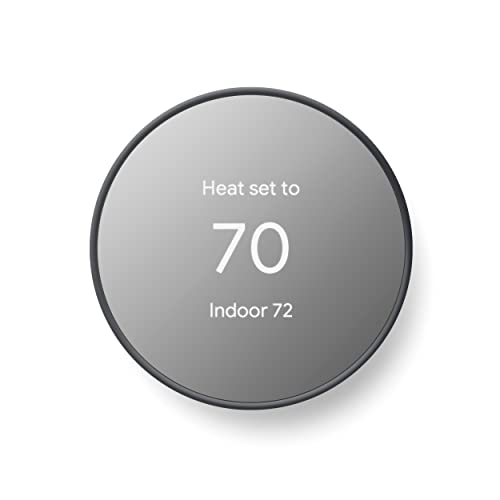
New AC Thermostat: The Complete Buyer's Guide
A new thermostat can transform how your air conditioner performs, how comfortable your home feels, and how efficiently your system runs. This guide explains everything you need to know before choosing and installing one.
Compare Thermostat TypesIf you are researching a new AC thermostat, you are likely at the stage where you already know your air conditioner needs better control, but you are unsure which type fits your system, your wiring, and your daily routine. A thermostat is the command center of your cooling system, and choosing the right one affects comfort, energy use, and equipment lifespan. This guide walks you through thermostat types, smart features, compatibility checks, installation considerations, and common mistakes so you can make a confident decision.
Quick takeaway: The best new AC thermostat is the one that matches your HVAC system's wiring, supports your comfort needs, and offers features you will actually use. Compatibility comes before features every single time.
What a New Thermostat Actually Does
A thermostat is more than a temperature dial. It reads the ambient temperature, compares it to your setpoint, and signals your air conditioner to start, stop, or modulate output. Modern thermostats can also manage fan behavior, staging, humidity targets, and scheduling. When your thermostat malfunctions or is outdated, your AC may short cycle, run longer than necessary, or fail to maintain consistent temperatures. In many cases, symptoms that look like an AC problem, such as a unit that is running but not cooling, trace back to thermostat settings, wiring, or sensor placement rather than the AC itself.
Upgrading to a new thermostat is one of the least invasive improvements you can make to a cooling system. It does not require replacing refrigerant lines or ductwork, yet it can deliver noticeably steadier comfort and more predictable operation.
Types of Thermostats for AC Systems
Thermostats generally fall into four categories. Each category suits a different level of control, installation complexity, and system compatibility.
1. Non-Programmable Thermostats
These are the simplest models: a dial or digital display, a temperature setpoint, and a fan switch. They are reliable and easy to operate, which makes them a solid choice for rental units, garages, or homeowners who prefer a hands-off approach. Their limitation is that they cannot schedule temperature changes, so the AC runs the same way whether the house is occupied or empty.
2. Programmable Thermostats
Programmable models let you set daily schedules, such as a warmer setpoint during work hours and a cooler setpoint in the evening. They are a good middle ground for households with predictable routines. If your cooling system struggles to keep up during peak afternoon heat, scheduling pre-cooling earlier in the day can reduce strain, especially in homes where the AC is not keeping up with the heat.
3. Smart Thermostats
Smart thermostats connect to Wi-Fi and offer app control, learning algorithms, geofencing, and detailed energy reports. They can detect when you leave and adjust setpoints automatically. Many also integrate with voice assistants and home automation platforms. Smart models are typically the most feature-rich option in the thermostat category and suit households that want granular control and remote access.
4. Zoning and Multi-Stage Thermostats
Homes with zoning systems or multi-stage equipment need thermostats designed to manage dampers or staged heating and cooling. Using a basic thermostat on a multi-stage system can prevent the equipment from operating as intended. If your home has separate zones or a variable-speed compressor, confirm the thermostat supports those configurations before purchasing.
Thermostat Comparison by Tier and Category
The table below groups thermostats by market tier and intended use. It uses neutral descriptors instead of numeric figures so the guidance stays relevant over time.
| Tier | Category | Best For | Key Characteristics |
|---|---|---|---|
| Essential tier | Non-programmable | Simple setups, rentals, garages | Basic dial or digital control, minimal wiring, highly reliable |
| Starter tier | Programmable | Households with fixed daily schedules | Seven-day scheduling, backlit display, straightforward installation |
| Mid-tier | Entry smart thermostat | First-time smart thermostat buyers | Wi-Fi app control, basic geofencing, remote setpoint changes |
| High-end tier | Full-featured smart thermostat | Tech-forward homes, multi-stage systems | Learning algorithms, energy reports, multi-stage support, broad integration |
| Professional-grade | Zoning and commercial controls | Zoned homes, light commercial spaces | Damper control, multi-zone scheduling, robust terminal support |
Compatibility: The Most Important Check
Before buying any new thermostat, verify three things: wiring, system type, and power requirements.
- Wiring terminals: Identify which terminals your existing thermostat uses. Common labels include R, RC, RH, W, Y, G, O, B, AUX, and C. Count them and photograph the wiring before disconnecting anything.
- System type: Conventional single-stage cooling, heat pump, dual-fuel, and multi-stage systems each require different terminal support. Heat pump systems need an O/B reversing valve terminal.
- C-wire: Most smart thermostats need a continuous power wire known as the C-wire. If your current thermostat has no C terminal, check whether the thermostat bundle includes a power adapter or whether an unused wire can be repurposed. Without proper power, a smart thermostat may drain its battery, reboot, or display errors.
Compatibility checkers provided by thermostat manufacturers are useful, but they rely on accurate input. When in doubt, a short consultation with an HVAC technician prevents return shipping and installation frustration.
Practical tip: If your AC is currently on but not cooling the house, do not assume the thermostat is the cause. Confirm the thermostat is set to COOL, the fan is on AUTO, and the setpoint is below room temperature before investigating the equipment itself.
Smart Features Worth Paying Attention To
Not every smart feature matters for every household. Consider which of the following align with your daily life:
- Geofencing: Adjusts setpoints based on whether occupants are home. Useful for households with irregular schedules.
- Learning algorithms: Observe adjustment patterns and build a schedule automatically. Helpful for people who dislike manual programming.
- Energy reports: Show runtime and usage trends. Useful for identifying when cooling demand spikes.
- Remote access: Allows setpoint changes from a phone. Handy for second homes, pet owners, and travelers.
- Humidity control: Some thermostats support humidity targets or dehumidification modes if your equipment allows it.
- Home automation integration: Connects with platforms and voice assistants for unified control.
Features add convenience, but reliability and compatibility remain the priority. A feature-rich thermostat that reboots because of inadequate power is worse than a simple programmable model that works every day.
Installation: DIY or Professional?
Replacing a thermostat is often a manageable DIY task when the wiring matches, the system is conventional, and the new thermostat includes clear instructions. The basic process involves turning off the air handler, labeling wires, removing the old unit, mounting the new base plate, reconnecting wires to matching terminals, and restoring power.
Professional installation is the safer route when any of the following apply:
- The existing wiring is unlabeled, damaged, or non-standard.
- The system is a heat pump, dual-fuel, or multi-stage configuration.
- No C-wire is present and no adapter kit is included.
- The thermostat controls zoning dampers or auxiliary equipment.
- You are uncomfortable working near line-voltage components or the air handler.
If installation reveals wiring irregularities, or if the AC behaves oddly afterward, for example turning on but not blowing air, stop and have the system checked. A miswired thermostat can blow a low-voltage fuse or prevent the compressor from engaging.
Placement and Configuration Matter
Even a premium thermostat performs poorly if it is placed where it reads the wrong temperature. Avoid mounting near direct sunlight, supply registers, lamps, televisions, exterior doors, or kitchen heat sources. Interior walls on a frequently used hallway are usually a good choice, roughly five feet above the floor.
After installation, configure these settings carefully:
- Set the equipment type correctly (conventional or heat pump).
- Set the number of cooling stages to match the equipment.
- Set the fan behavior for AUTO or CIRC as desired.
- Set temperature differential or cycle rate if the thermostat exposes those options.
- Verify calibration against a separate thermometer after the system stabilizes.
If the system begins cycling unusually, or the blower runs while cooling does not, revisit the configuration before assuming a hardware fault. A thermostat set to the wrong equipment type is a common cause of behavior that resembles an AC unit running without cooling.
When a New Thermostat Is the Right Move
Consider replacing your thermostat when:
- The display is blank, dim, or intermittently unresponsive.
- The setpoint and actual temperature diverge consistently.
- The AC short cycles or runs constantly regardless of settings.
- You want scheduling, remote control, or energy reporting.
- You are replacing the air conditioner and the existing thermostat cannot support the new equipment's staging.
Conversely, if the AC is not cooling properly across all rooms, or the air conditioner is dripping water inside, the thermostat is unlikely to be the root cause. Those symptoms point to airflow, refrigerant, or drainage issues that require system-level diagnosis.
Common Mistakes to Avoid
- Buying before checking wiring. Terminal mismatch is the most common reason new thermostats are returned.
- Ignoring the C-wire requirement. Battery-only smart thermostats can work, but reliability varies and features may be limited.
- Skipping the equipment-type setting. Heat pump systems configured as conventional systems will not run correctly.
- Mounting in a poor location. False temperature readings cause uneven cooling and unnecessary cycling.
- Overlooking system staging. Multi-stage equipment needs a thermostat that can command each stage.
- Assuming every cooling fault is electrical. Some issues are airflow or refrigerant related, and no thermostat change will resolve them.
If your existing system is off but still blowing air, the thermostat fan setting is often the explanation. Check whether the fan is set to ON rather than AUTO before assuming a fault.
Frequently Asked Questions
Do I need a C-wire for a new AC thermostat?
Most smart thermostats require a C-wire for continuous power. If your existing thermostat lacks one, you can use a thermostat bundled with a power adapter kit, repurpose an unused wire if one exists, or have a technician run a new wire. Without adequate power, a smart thermostat may lose connectivity or reboot frequently.
Can I install a new thermostat myself?
Yes, for conventional single-stage systems with clearly labeled, matching wiring. If you have a heat pump, multi-stage equipment, zoning, or unlabeled wires, professional installation is safer and usually faster. Always photograph the existing wiring before disconnecting anything.
What is the difference between a programmable and a smart thermostat?
A programmable thermostat follows a schedule you set manually. A smart thermostat learns patterns, adjusts automatically, and offers app control, geofencing, and energy reporting. Smart models suit households that want remote access and adaptive scheduling.
Why is my AC running but not cooling after a thermostat replacement?
The most likely causes are incorrect equipment-type configuration, a miswired terminal, a blown low-voltage fuse, or a thermostat that does not support the system's staging. Recheck the wiring against the installation guide and verify the equipment type setting before calling a technician.
How long does a thermostat typically last?
Most thermostats operate reliably for a decade or longer. Mechanical dial models can drift over time, and smart thermostats may lose software support eventually. If the display fails, readings become inconsistent, or the unit stops responding to adjustments, replacement is reasonable.