
AC with Wi-Fi Smart Control: The Complete Buyer's Guide
Learn how smart air conditioners work, which features matter most, and how to choose a connected cooling system that fits your home, routine, and long-term energy goals.
START LEARNINGWhy this guide matters: A Wi-Fi air conditioner is more than a remote control on your phone. It changes how you schedule cooling, monitor energy use, and integrate comfort into your daily life. This page walks you through the technology, the trade-offs, and the practical checklist so you can decide with confidence before you buy.
What You Will Find on This Page
What Wi-Fi Smart Control Actually Means
A Wi-Fi air conditioner includes a built-in network module that connects to your home router. Once linked to the manufacturer's app, the unit becomes part of your home network. You can control it from the same room, from another floor, or from anywhere with an internet connection.
This is different from a unit that only ships with a traditional infrared remote. An IR remote requires line of sight and close range. Wi-Fi control removes both limits and adds data: runtime logs, filter reminders, energy summaries, and automation triggers. That data layer is what makes a connected AC useful beyond simple on and off commands.
Smart control also changes how the unit interacts with the rest of your home. Many models respond to voice commands through major assistants, and some expose their status to broader smart home platforms. If you are building a connected home, a Wi-Fi AC can become one of the most frequently used devices in your automation setup.
It helps to separate the physical cooling hardware from the connectivity layer. The compressor, coils, and airflow design determine raw cooling performance. The Wi-Fi module and app determine how conveniently you can operate that performance. A strong smart app on a poorly sized unit will still leave you uncomfortable, so always match capacity to the room first. Our guide on how to size an air conditioner covers that foundation in detail.
How the Technology Works
Understanding the data path helps you troubleshoot and plan your network. The typical chain looks like this: the AC connects to your router over Wi-Fi, the router connects to the internet, and the manufacturer's cloud service relays commands between your phone and the unit.
The Core Components
- Wi-Fi module: The radio and firmware inside the AC that handles network communication and local control logic.
- Companion app: The interface on your phone or tablet for temperature, mode, fan speed, schedules, and diagnostics.
- Cloud service: The backend that authenticates accounts, stores schedules, and enables remote access when you are away from home.
- Local control path: Some units keep working through the app on the same network even if the internet link drops, which is useful during outages.
Local vs Cloud Control
Cloud-based control is the most common approach. It enables remote access and firmware updates, but it depends on the manufacturer keeping servers online. Local control keeps commands inside your home network and can be faster and more private, though it usually requires a more advanced setup. When comparing models, ask whether the app supports local operation when the internet is unavailable.
Voice Assistants and Automation
Most smart AC apps link to at least one major voice assistant. Common commands include setting a target temperature, switching modes, and turning the unit off at bedtime. More advanced setups use geofencing or routines: the AC starts cooling when you leave work, or pauses when a window sensor reports that a window is open. These automations are where smart control delivers the most practical daily value.
Key Features to Compare
Not every connected AC offers the same depth of control. The feature set below is the practical checklist most buyers should review before committing to a model.
Remote App Access
Turn the unit on or off, adjust temperature, and change modes from anywhere with an internet connection.
7-Day Programmable Timers
Set different schedules for weekdays and weekends, with multiple on and off events per day.
Voice Assistant Support
Link the unit to a major assistant for hands-free temperature and mode changes.
Energy Monitoring
Review runtime and estimated consumption to spot inefficient habits and adjust schedules.
Geofencing and Routines
Trigger cooling based on location, time of day, or other connected sensors in your home.
Auto-Restart After Outage
Resume the previous settings automatically when power returns after an interruption.
Efficiency Ratings Still Matter
Smart features do not replace efficiency. A connected unit with a strong efficiency rating will use less energy over the season than a comparable unit with a lower rating, regardless of app quality. Review the efficiency labels and understand the difference between older and newer rating systems. Our explainer on energy efficiency ratings (SEER, EER, HSPF) breaks down what each number means in practice.
Quiet Operation and Air Quality
For bedrooms and home offices, noise level is often as important as connectivity. Look for published sound levels at the fan speeds you expect to use. If allergy relief matters, compare models that include filtration or purification stages. Our page on AC with air purifier covers how filtration integrates with cooling.
Practical tip: Write down your three most important smart features before you shop. App quality, schedule depth, and voice support are the three areas where connected models differ most. Prioritizing them prevents feature overload and keeps your decision focused.
Product Tiers and What Each Offers
Smart AC models generally fall into three broad tiers. The differences are about app depth, automation flexibility, and build quality rather than any single specification.
| Tier | Typical Smart Features | Best For |
|---|---|---|
| Entry-level | Basic app control, on/off and temperature, simple timer, one voice assistant | First smart AC, renters, single-room cooling |
| Mid-range | 7-day scheduling, energy monitoring, multiple voice assistants, geofencing | Bedrooms, home offices, daily scheduled use |
| Premium | Advanced automation, local control options, multi-zone support, detailed diagnostics | Whole-home setups, smart home enthusiasts, multi-room integration |
Entry-level smart units now cover the essentials for most households. Mid-range models add the scheduling and monitoring depth that makes daily use more convenient. Premium models are aimed at buyers who want deeper automation or plan to integrate cooling with other systems. When comparing within a tier, focus on app stability, update history, and support responsiveness, because those determine long-term satisfaction more than a longer feature list.
For buyers who also want hands-off temperature management, consider how the unit pairs with an external controller. A thermostat that controls heat and cool can complement a smart AC and centralize scheduling across seasons.
How to Choose the Right Smart AC
Use the following sequence to narrow your options without getting lost in specifications.
Step 1: Match Capacity to the Room
Start with room size, ceiling height, sun exposure, and occupancy. A unit that is too small will run constantly; one that is too large will short-cycle and leave the room humid. Use our 8,000–10,000 BTU AC guide or 12,000–14,000 BTU AC guide depending on your space, and confirm with a load calculation if the room is unusual.
Step 2: Choose the Form Factor
Smart control is available across window, portable, mini-split, and central systems. Window units are the simplest to install and often the most direct path to smart features. Portable units offer placement flexibility. Mini-splits serve rooms without ductwork. Central systems integrate whole-home comfort. Explore our window AC guide and ductless mini-split guide to compare installation effort and coverage.
Step 3: Verify App and Ecosystem Compatibility
Check that the app is available for your phone platform, that it supports the voice assistant you use, and that recent reviews mention stable connectivity. If you already use a smart home platform, confirm whether the AC integrates natively or only through a voice assistant.
Step 4: Confirm Network Requirements
Most smart ACs connect over the 2.4 GHz band, which has better range through walls than 5 GHz. Confirm that your router broadcasts a 2.4 GHz network in the room where the unit will operate. If your router uses a single combined network name, you may need to separate the bands during setup.
Step 5: Review Efficiency and Noise
Compare efficiency ratings and published sound levels at the fan speeds you will actually use. A slightly higher-efficiency unit often makes more sense over a full cooling season. For bedrooms, prioritize quiet operation. Our quiet air conditioner guide covers how to read noise specifications.
- Capacity matches the room size and heat load
- App is stable and actively updated
- Voice assistant compatibility confirmed
- 2.4 GHz network available at the install location
- Efficiency rating suits your climate and usage
- Noise level acceptable for the room
- Warranty covers both hardware and app-supported features
Setup, Network, and Security Tips
Most setup problems trace back to the network rather than the appliance. A few precautions make the process smoother.
Before You Connect
- Place the unit within reliable Wi-Fi range of the router.
- Have your Wi-Fi password ready and confirm the network name.
- Create the manufacturer account in the app before starting pairing.
- Update the app to the latest version to avoid pairing bugs.
During Pairing
Follow the app's pairing sequence exactly. Many units use a temporary access point mode, where the AC broadcasts its own signal during setup. Keep your phone close to the unit during this step. If pairing fails, restart the router, reset the AC's network settings, and try again. Do not change router settings mid-pairing.
Security Basics
- Use a unique password for the AC app account, not one reused elsewhere.
- Enable two-factor authentication if the app offers it.
- Keep the AC firmware updated through the app.
- Review which household members have access to the unit.
- If you sell the unit, remove it from your account and reset the network settings.
Note: Remote access depends on the manufacturer's cloud service. If the service is discontinued, local app control may still work, but remote control and some automations will stop. This is a risk inherent to all connected appliances, so choose brands with a track record of long-term app support.
Maintenance for Connected Units
Smart features add convenience, but the physical maintenance schedule remains the same. A connected unit that is not cleaned will lose efficiency regardless of how well the app works.
Routine Maintenance Tasks
- Filters: Clean or replace according to the app's filter reminder and the manufacturer's interval. Clogged filters reduce airflow and raise energy use.
- Coils: Keep evaporator and condenser coils clean. Dust and debris reduce heat transfer efficiency.
- Drainage: Check the condensate drain path for blockages, especially before peak season.
- Outdoor unit: Clear leaves and debris around the condenser and confirm the fan spins freely.
- Firmware: Install app and firmware updates when prompted to maintain security and connectivity stability.
Our window air conditioner energy efficiency rating guide explains how maintenance affects real-world efficiency, and the quiet AC guide includes tips for keeping noise levels low over time. If you notice the unit running more often than usual, review the energy monitoring data in the app before assuming a hardware fault.
When to Call a Technician
Schedule professional service if the unit stops cooling, leaks refrigerant, makes unusual mechanical noises, or repeatedly loses its network connection after basic troubleshooting. Electrical and refrigerant work should always be handled by a qualified technician.
Frequently Asked Questions
How does Wi-Fi smart control work on an air conditioner?
A Wi-Fi module inside the AC connects to your home network. Through a companion app, you can switch the unit on or off, set temperature, change modes, and schedule operation from anywhere with an internet connection. Many models also support voice assistants and automation routines.
Do I need a smart hub to use a Wi-Fi air conditioner?
Most Wi-Fi air conditioners work through their own app without a separate hub. A hub is only needed if you want advanced cross-device automation with other smart home products. Always check the app ecosystem and voice assistant compatibility before buying.
What happens to smart features during a power outage?
After power returns, most units restore their previous settings or resume the last operating mode automatically. Remote access requires your home router to be back online. Check whether the model offers auto-restart and schedule persistence after a power interruption.
Is a Wi-Fi air conditioner worth it compared to a standard unit?
Smart control adds convenience, better scheduling, and the ability to monitor energy usage. If you value remote operation, automation, and tighter temperature management, a Wi-Fi model is a solid choice. Entry-level smart units now offer many of these features, so the gap between tiers is narrowing.
Can multiple people control the same Wi-Fi air conditioner?
Yes. Most apps allow multiple household members to link to the same unit, each with their own login. Some apps support role-based access so guests or family members have limited control. Voice assistants can also be linked per user account.
Recommended AC with Wi-Fi Smart Control
⚠️ AFFILIATE DISCLOSURE: This website contains affiliate links. As an Amazon Associate, we earn from qualifying purchases. If you make a purchase through these links, we may receive a small commission at no additional cost to you. Read our full affiliate policy.

Breez Max Smart WiFi Thermostat for Mini-Split, Window, Portable AC (White) | AHR Product of the Year | Smart AC Controller | AI-Based Tech | Free App, No Subscription | Alexa, Google, IFTTT, SmartThings
Check price on Amazon
Breez Lite Smart AC Controller for Mini-Split, Window, Portable ACS (White) | WiFi Controller, Alexa, Google, Siri Shortcuts, SmartThings, IFTTT, Free App, NO Subscriptions | Schedules, Geofencing, Comfy
Check price on Amazon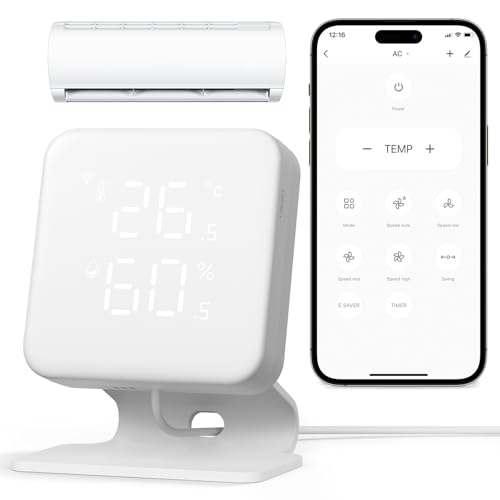
WOOX Smart AC Controller, WiFi Thermostat for Mini Split, Window & Portable AC & Heat Pump, Built-in Temperature & Humidity LED Display, IR Remote, App Control, Alexa & Google Home, 2.4GHz, No Hub
Check price on Amazon
WiFi Thermostats for Home Smart Thermostat Single-Stage 1Heat/ 1Cool, APP Remote Control, 7-Day or 0-Day Programmable. (C-Wire Required)
Check price on Amazon
Sensi Smart Thermostat, Wi-Fi, DIY, Alexa, Energy Star Certified, ST55
Check price on Amazon
Breez Max Smart WiFi Thermostat for Mini-Split, Window, Portable AC (Black) | AHR Product of the Year | Smart AC Controller | AI-Based Tech | Free App, No Subscription | Alexa, Google, IFTTT, SmartThings
Check price on Amazon
Sensibo Sky, Smart Wireless Air Conditioner Controller. Quick & Easy DIY Installation. Maintains Comfort with Energy Efficient. Automatic Wifi Thermostat Control App. Google, Alexa and Siri Compatible
Check price on Amazon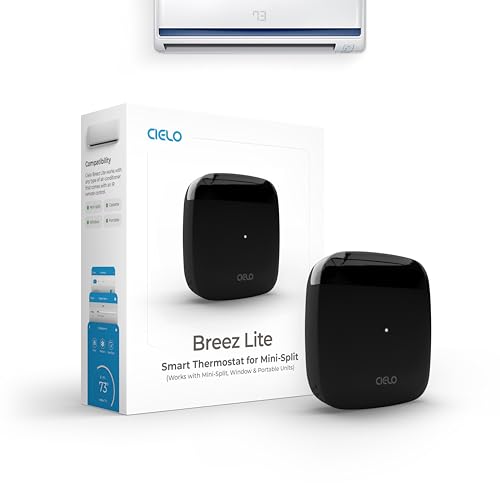
Breez Lite Smart AC Controller for Mini-Split, Window, Portable ACS (Black) | WiFi Controller, Alexa, Google, Siri Shortcuts, SmartThings, IFTTT, Free App, NO Subscriptions | Schedules, Geofencing, Comfy
Check price on AmazonDisclaimer
Some of the content on this site uses AI assistance. Information is provided for educational purposes only. We are not responsible for any losses resulting from the use of this information. By using this site, you waive any right to bring legal claims against us arising from your use of the information provided. If you do not agree, please do not use this site. Read the full disclaimer.