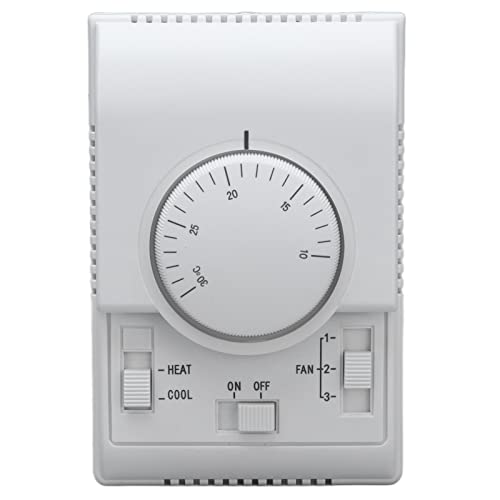
Central Air Thermostat Not Working: Causes & Fixes
When your central air thermostat stops responding, the whole house feels it. This guide walks you through the most common causes, a safe step-by-step troubleshooting process, and how to decide between repairing and replacing the thermostat.
Why this matters: A thermostat is the command center of your central air system. If it fails to read temperature correctly or refuses to send a signal, the AC may run constantly, short-cycle, or not start at all. Many thermostat problems are simple to diagnose — dead batteries, a tripped breaker, or a wrong mode setting — while others point to wiring or control-board faults that need a professional. The information below helps you sort the easy fixes from the ones that require an HVAC technician, so you can make a confident decision.
Signs Your Central Air Thermostat Is Not Working
Before you start troubleshooting, confirm what "not working" actually looks like. Thermostat failures usually show up in one of these patterns:
- Blank display: The screen is completely dark with no numbers or icons.
- Frozen or unresponsive screen: The display is lit but does not respond to button presses.
- Wrong temperature reading: The room feels much warmer or cooler than the number shown.
- AC will not start: The thermostat shows "cool" but the outdoor unit or air handler never engages.
- Short cycling: The system turns on and off in short bursts instead of running a full cycle.
- Fan runs constantly: The blower keeps running even when the setpoint is reached.
- No schedule response: Programmable or smart schedules no longer trigger the system.
Each pattern points to a different layer of the system — power, settings, wiring, or the thermostat hardware itself. The troubleshooting steps below follow that order, from simplest to most involved.
Step-by-Step Troubleshooting
Work through these steps in order. Stop as soon as the thermostat responds normally. If you reach a step that requires opening panels or handling wires, and you are not comfortable doing so, call a licensed technician.
Replace the Batteries
Most battery-powered thermostats go blank or act erratically when the cells are weak. Use fresh batteries of the correct type and check the battery contacts for corrosion.
Check the Breaker
Reset the air handler and condenser breakers at the main panel. A tripped breaker starves the thermostat of low-voltage power and mimics a dead unit.
Verify Mode and Setpoint
Confirm the thermostat is set to COOL, the fan is on AUTO, and the setpoint is at least 3°F below room temperature. A common false alarm is a schedule override.
Reset the Thermostat
Use the reset button or the breaker-off method for 60 seconds, then restore power. Many glitches clear with a full power cycle.
Inspect the Low-Voltage Wires
With power off, check that the R, Y, G, and W wires are seated firmly in their terminals. Loose or corroded connections cause intermittent operation.
Test the Thermostat Output
If the screen works but the AC never engages, the thermostat may not be sending a signal. A technician can test the Y and G terminals to confirm.
Common Causes Explained
1. Power Supply Problems
The thermostat receives low-voltage power from the air handler transformer, usually 24 volts. If the air handler breaker trips, the transformer fails, or a fuse on the control board blows, the thermostat goes dark. This is the single most common reason a central air thermostat appears dead. Check the breaker panel first, then confirm whether the air handler's control board has a blown fuse.
2. Battery and Display Failures
Older and mid-range battery-powered thermostats rely on AA or AAA cells. When those weaken, the screen dims, the backlight stops, or the thermostat resets its schedule. Corroded contacts are another frequent culprit in humid climates. Replacing the batteries and cleaning the contacts solves a large share of blank-screen complaints. If the display stays dead after fresh batteries, the unit itself may have failed.
3. Wiring and Terminal Issues
Loose, corroded, or miswired terminals cause erratic behavior. A thermostat that works sometimes and not others often has a marginal connection at R, Y, or G. If you recently replaced the thermostat or had the air handler serviced, recheck that the wire colors match the terminal labels. For systems with a heat pump, the O/B reversing valve wire adds another point of failure.
4. Settings and Smart Features
Modern programmable and smart thermostats can appear broken when they are actually following a schedule, a geofence rule, or a hold setting. Check the app or the on-device menu for active holds, vacation mode, or a locked keypad. Firmware updates can also briefly interrupt control, so a reboot is worth trying before assuming hardware failure.
5. Thermostat Hardware Failure
Mechanical thermostats with bimetallic coils drift over time and lose calibration. Digital units can suffer failed relays, cracked solder joints, or moisture damage. A thermostat that reads room temperature 5°F or more off, or that no longer clicks when it calls for cooling, is usually at the end of its service life.
6. HVAC System Faults That Mimic Thermostat Failure
Sometimes the thermostat is fine and the problem sits elsewhere. A failed capacitor, a locked compressor, a clogged drain switch, or a refrigerant issue can prevent the system from starting even when the thermostat is calling. If the thermostat screen responds and clicks but nothing happens at the air handler or condenser, the fault is in the HVAC equipment or wiring, not the thermostat.
Thermostat vs. HVAC System: How to Tell the Difference
| Symptom | Likely Culprit | What to Check First |
|---|---|---|
| Blank or dark display | Thermostat power or batteries | Batteries, breaker, air handler fuse |
| Screen works but no cooling | HVAC system or wiring | Breakers, air filter, condenser contactor |
| Temperature reads wrong | Thermostat calibration or placement | Direct sunlight, drafts, nearby heat sources |
| Short cycling | Thermostat or system sizing | Setpoint, schedule, airflow, refrigerant charge |
| Fan runs but no cold air | HVAC system | Outdoor unit, compressor, refrigerant lines |
| Unresponsive buttons | Thermostat hardware | Reset, keypad lock, firmware |
This quick-reference table separates thermostat-specific symptoms from system-level faults. When in doubt, start with the thermostat because it is the easiest component to test and the one most often replaced.
When to Repair and When to Replace
Repairing a thermostat is rarely practical once the control board or display fails. Thermostats are relatively simple devices, and replacement parts for older models are often discontinued. Use these guidelines:
- Repair: Dead batteries, tripped breakers, loose wires, or a schedule override. These are quick fixes that do not require a new unit.
- Replace: A blank display after fresh batteries, inaccurate temperature readings, unresponsive buttons, or repeated failures after reset. Replacement is usually the more reliable path.
- Call a technician: If the thermostat works but the system does not start, or if you see damaged wires, burnt terminals, or signs of moisture inside the wall.
When replacement is needed, choose a thermostat tier that matches your system and comfort goals:
- Essential tier: Non-programmable or basic programmable models for simple single-stage systems and straightforward operation.
- Balanced tier: Programmable and entry smart thermostats with scheduling, remote access, and compatibility with most single-stage and heat pump systems.
- High-end tier: Smart thermostats with room sensors, geofencing, learning schedules, and multi-stage or heat pump support.
- Professional-grade tier: Contractor-oriented communicating thermostats designed for variable-speed systems and zoned installations.
Match the thermostat tier to your HVAC equipment. A high-end thermostat on a basic single-stage system delivers fewer benefits than the same unit on a variable-speed system.
Replacement and Compatibility Checklist
If you decide to replace the thermostat, confirm these points before purchasing:
- System type: Conventional single-stage, heat pump, dual-fuel, or multi-stage. The thermostat must support your configuration.
- Voltage: Most residential thermostats use 24V low voltage. Line-voltage thermostats are used for electric baseboard heat and are not interchangeable.
- Wire count: Count the wires at the existing thermostat. A unit with five or more wires suggests a heat pump or multi-stage system.
- C-wire availability: Smart thermostats often need a common wire. If your bundle lacks a C-wire, choose a model with a power adapter or use a compatible kit.
- Mounting and placement: Avoid direct sunlight, exterior walls, and areas near supply registers. Poor placement causes inaccurate readings.
For a deeper look at how thermostats integrate with central systems, see our guide to the central air conditioner thermostat and the broader central air thermostat overview. If your system runs but does not cool, the thermostat may not be the culprit — review central air conditioner not blowing cold air or central air running but not blowing cold air before replacing parts.
Preventive Maintenance for Thermostats
Most thermostat failures are preventable with a few habits:
- Replace batteries once a year, ideally before cooling season begins.
- Keep the thermostat free of dust and lint by wiping it with a dry cloth.
- Schedule a professional HVAC tune-up annually; technicians check thermostat calibration and wiring as part of the service.
- Avoid covering the thermostat with furniture, curtains, or shelving that traps air.
- Update smart thermostat firmware and review schedules after daylight-saving changes.
Routine maintenance also protects the rest of the system. Pair thermostat care with regular filter changes and coil cleaning, described in our air conditioner coil cleaning and common AC problems resources.
Frequently Asked Questions
Why is my central air thermostat not working?
The most common reasons include dead batteries, tripped circuit breakers, loose wiring, a blank or unresponsive display, incorrect settings, or a failed thermostat unit. Start with simple checks like batteries and power before assuming the unit has failed.
How do I know if my thermostat is broken or if it is the AC unit?
If the thermostat screen is blank or unresponsive even after replacing batteries, the thermostat is likely faulty. If the thermostat responds but the AC does not start, the problem may be with the air handler, condenser, wiring, or a tripped breaker.
Should I replace my thermostat myself?
Low-voltage thermostats can often be replaced by confident DIYers after switching off power at the breaker. However, if you are unsure about wiring labels, have a heat pump with auxiliary stages, or see damaged wires, hire a licensed HVAC technician.
How often should a thermostat be replaced?
Most thermostats last 10 to 15 years. Mechanical models tend to wear out sooner, while modern programmable and smart thermostats may last longer. Replace yours when it becomes inaccurate, unresponsive, or incompatible with a new HVAC system.
Ready to Compare Thermostat Options?
Browse recommended thermostats and accessories that match your central air system, from essential tier models to high-end smart units.
View Recommendations