Electrical Outlet With USB Port: Complete Buyer's Guide
Charging cables and wall adapters clutter every room. A USB wall outlet replaces that tangle with integrated charging ports built directly into the receptacle, while keeping standard AC outlets for everything else. This guide explains how they work, how to choose the right model, and what to check before installation.
Start ReadingWhat Is an Electrical Outlet With a USB Port?
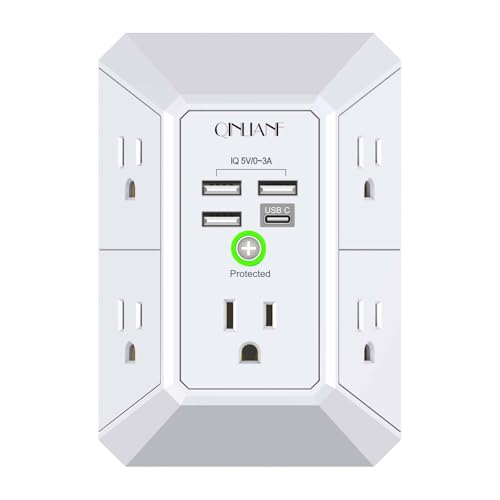
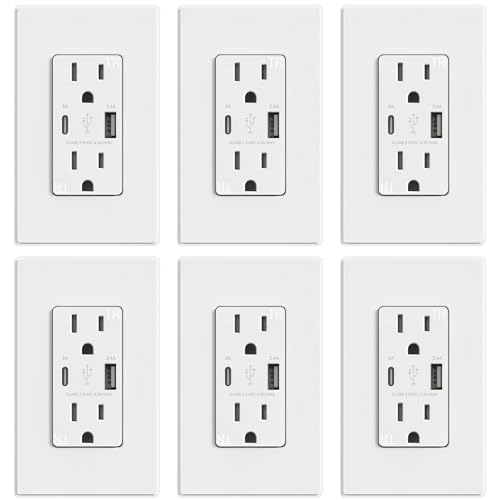
An electrical outlet with a USB port is a standard wall receptacle that adds one or more USB charging ports alongside the conventional AC outlets. Instead of plugging a separate charging block into the wall, you connect your cable directly to the outlet's USB port. The outlet's internal circuitry converts the household AC supply into the low-voltage DC power that phones, tablets, earbuds, and other small electronics require.
The concept is simple, but the details matter. USB outlets differ in port count, port type, charging standards, amperage ratings, and safety features. Choosing well means matching those details to where the outlet will be installed and what devices will charge there. This guide walks through each decision so you can compare models with confidence.
USB wall outlets are part of a broader set of electrical upgrades homeowners make during renovation or retrofit. If you are also reviewing the basics of wall receptacles and plug types, the guide on electrical outlet plugs is a useful companion read before you narrow down to USB-specific models.
Key idea: A USB outlet does not replace your existing circuit. It replaces the receptacle device on that circuit, adding charging ports without changing how the home is wired.
How USB Wall Outlets Work
Inside the outlet, a small power supply converts the 120-volt AC line into a regulated DC output, typically 5 volts for standard USB charging and higher voltages for fast-charging standards. The conversion happens continuously while the outlet is powered, though modern designs draw very little power when nothing is connected.
The AC side stays the same
The two or three AC receptacles on the device function exactly like a standard outlet. They are wired to the same hot, neutral, and ground conductors and are protected by the same branch circuit breaker. The USB circuitry taps into the same supply internally.
The USB side is a built-in charger
Think of the USB portion as a permanently installed charging block. It negotiates with the connected device to deliver the appropriate current. Older USB-A ports typically deliver up to 2.4 amps shared across ports, while USB-C ports with Power Delivery can deliver considerably more to compatible devices.
Shared power across ports
When multiple devices charge at once, the outlet divides its available USB output among them. A well-designed model manages this automatically. If you regularly charge several power-hungry devices in one location, check the total USB output rating rather than just the per-port figure.
USB outlets are often installed as part of a broader electrical refresh. If you are also considering smart controls for the room, the guide on an electronic home thermostat shows how modern control devices fit into the same planning process.
Types of USB Outlets
USB outlets come in several configurations. The table below compares the main categories using universal tier descriptors rather than numeric figures.
| Outlet Type | Best For | Tier Positioning | Notes |
|---|---|---|---|
| Standard duplex with 2 USB-A ports | Bedrooms, kitchens, general charging | Essential tier | Simple, reliable, widely available |
| Duplex with USB-A and USB-C combo | Mixed device households | Balanced tier | Covers legacy and modern cables |
| Dual USB-C with Power Delivery | Laptops, tablets, fast-charging phones | Premium tier | Higher output; best for power-hungry devices |
| Tamper-resistant USB outlet | Homes with children | Balanced tier | Shutters block foreign objects |
| Weather-resistant outdoor USB outlet | Patios, garages, covered porches | Premium tier | Requires weather-rated box and cover |
| USB outlet with built-in night light | Hallways, nurseries, bathrooms | Balanced tier | Adds ambient lighting at the receptacle |
Single-gang replacement vs new installation
Most USB outlets are designed to drop into an existing single-gang wall box, making them a direct replacement for a standard receptacle. New installations follow the same wiring rules as any other outlet. In either case, the wall box must have enough room for the device and its wiring.
Combination devices
Some models combine USB ports with a GFCI or AFCI function, which is useful in kitchens, bathrooms, and other locations where protection is required. These are typically positioned in the balanced to premium tiers because of the added circuitry.
Key Specs to Compare Before Buying
Two outlets can look identical on the shelf and behave very differently in daily use. These are the specifications that matter most.
Amperage rating of the AC receptacles
Most residential outlets are rated for 15 amps, and some are rated for 20 amps. The rating must match the branch circuit and the wiring. A 20-amp outlet on a 15-amp circuit is a mismatch; always confirm the circuit rating before choosing.
Total USB output
Look at the combined USB output, not just the per-port maximum. A model that delivers high current to one device may share that output when a second device is connected. If you routinely charge two devices overnight, choose a model with generous total output.
Charging standards
USB-C ports may support Power Delivery, which allows compatible devices to negotiate higher voltage and current. USB-A ports may support proprietary fast-charging protocols. Check whether the outlet supports the standard your devices use.
Port count and orientation
Two ports is the most common configuration. Four-port models exist for charging stations. Port orientation matters in tight spaces: side-facing ports keep cables clear of the AC plugs, while front-facing ports are easier to reach.
Certification and build quality
Choose outlets with recognized safety certifications and durable construction. High-grade contacts and a solid build reduce heat and wear over years of daily use.
USB-A vs USB-C Ports on Wall Outlets
The choice between USB-A and USB-C is mostly about which cables you already own and which devices you plan to charge.
USB-A remains practical
USB-A is the familiar rectangular connector. It is still common on older phones, accessories, and many cables. A USB-A port on a wall outlet is a convenient default for guests and for devices that are not upgraded frequently.
USB-C is the forward-looking choice
USB-C is reversible, supports higher power delivery, and is now standard on most new phones, tablets, and laptops. A USB-C port with Power Delivery can charge a laptop from the wall outlet without a separate power brick, which is a meaningful convenience in a home office or kitchen.
Combination outlets
Many buyers choose a combination outlet with one USB-A and one USB-C port. That configuration covers legacy cables and modern devices without committing entirely to one standard. It is a balanced-tier choice that ages well.
Practical tip: If you are outfitting a room where guests charge phones, a USB-A port is still the most universally compatible. If the outlet is for your own daily devices, prioritize USB-C with Power Delivery.
Safety Features to Look For
A USB outlet sits on an energized circuit continuously, so safety features deserve careful attention.
Tamper-resistant shutters
Tamper-resistant receptacles include internal shutters that block foreign objects from entering the slots. They are required in many jurisdictions for new installations and are a sensible choice anywhere children are present.
Overcurrent and overvoltage protection
Quality outlets include circuitry that shuts down the USB output if current or voltage exceeds safe limits. This protects both the outlet and the connected device.
Thermal protection
Heat is the main enemy of any built-in power supply. Reputable models include thermal cutoffs and are designed to dissipate heat effectively. Avoid daisy-chaining power strips on the same circuit as a heavily loaded USB outlet.
GFCI and AFCI combinations
In kitchens, bathrooms, garages, and outdoors, ground-fault protection is typically required. Combination outlets with built-in GFCI protection simplify compliance. Arc-fault protection may be required in bedrooms and living areas depending on local code.
Proper grounding
USB outlets should be connected to a properly grounded circuit. In older homes with ungrounded wiring, consult an electrician before installing any device that relies on a ground connection. The article on electrical outlet plugs explains the plug and grounding basics that apply here as well.
Installation Planning
Replacing a standard outlet with a USB outlet is a modest project, but it should be planned with the same care as any electrical work.
-
Turn off the circuit
Switch off the breaker that feeds the outlet and verify that power is off with a tester before removing the old device. Never rely on the switch alone.
-
Inspect the wall box
Confirm the box has enough room for the new device and that the wiring is in good condition. Older boxes may be shallow or crowded; a box extension can help.
-
Verify the circuit rating
Match the outlet's amperage rating to the circuit and wiring. A 20-amp outlet belongs on a 20-amp circuit with appropriate wire.
-
Connect the wiring correctly
Connect hot, neutral, and ground to the corresponding terminals. Follow the manufacturer's instructions and local code requirements. A licensed electrician is the safest choice for any uncertainty.
-
Secure the device and cover plate
Mount the outlet in the box, attach the cover plate, and restore power. Test both the AC receptacles and the USB ports with a known-good cable and device.
If you are planning several electrical upgrades at once, the broader context in electrical outlet plugs helps you think about circuit capacity and outlet types together rather than one device at a time.
Placement by Room
The best USB outlet is the one installed where devices actually charge. A little planning by room improves daily usefulness.
Bedroom
A bedside outlet with two USB ports eliminates the need for a charging block on the nightstand. A model with a built-in night light can be a practical bonus in a nursery or guest room.
Kitchen
Kitchen outlets are high-traffic charging points for tablets and phones. Choose a model with GFCI protection if required, and consider a combination USB-A and USB-C port so guests and family members can both charge.
Home office
An outlet with dual USB-C Power Delivery ports can charge a laptop and a phone without separate bricks. This is where the premium-tier models earn their place.
Living room
A USB outlet near the sofa keeps streaming devices and phones charged without a visible adapter. Tamper-resistant shutters are useful in homes with young children.
Outdoors and garage
Only use outlets rated for the environment. A weather-resistant USB outlet in a proper enclosure is suitable for covered patios and garages. Standard indoor models should never be installed in exposed locations.
Pre-Purchase Checklist
Before you choose a USB wall outlet
- Confirm the circuit's amperage rating and wiring condition.
- Decide whether you need USB-A, USB-C, or a combination.
- Check the total USB output if you charge multiple devices.
- Look for recognized safety certifications.
- Choose tamper-resistant shutters if children are present.
- Confirm GFCI or AFCI requirements for the room.
- Measure the wall box depth to ensure the device fits.
- Decide whether a night light or other feature is useful.
- Plan professional installation if you are unsure about wiring.
- Review the warranty and support terms before installing.
Frequently Asked Questions
Can an electrical outlet with a USB port replace a standard wall outlet?
Yes, in most cases. A USB outlet is designed to fit the same single-gang wall box and wiring as a standard receptacle. It provides the same two or three AC receptacles plus integrated USB charging ports. An electrician or experienced DIY installer can swap it in as long as the circuit is properly grounded and the box has adequate space.
What is the difference between USB-A and USB-C ports on a wall outlet?
USB-A is the older rectangular connector and remains common for legacy cables. USB-C is the newer reversible connector that supports higher power delivery and is now standard on phones, tablets, and laptops. Many current outlets include both types, and some USB-C ports support fast-charging standards such as USB Power Delivery.
Do USB wall outlets require a special circuit or breaker?
No special breaker is required. USB outlets draw from the same 15-amp or 20-amp branch circuit as a standard receptacle. The USB portion is powered by an internal converter that steps the AC voltage down to the low DC voltage your devices need. The outlet still counts toward the load on the existing circuit.
Are electrical outlets with USB ports safe for continuous charging?
Yes, reputable USB outlets are designed for continuous duty and include overcurrent, overvoltage, and short-circuit protection. Choose models with recognized safety certifications and tamper-resistant shutters, especially in homes with children. Avoid daisy-chaining high-draw devices on the same circuit.
Can a USB wall outlet be installed outdoors?
Only if the outlet is rated for outdoor use and installed in a weather-resistant box with a while-in-use cover. Standard indoor USB outlets are not suitable for exposed exterior locations. Check the product listing for outdoor ratings and follow local electrical codes.
How many USB ports should a wall outlet have?
Most models offer two USB ports, which covers a phone and a tablet or two phones at once. Some higher-tier models include four ports or a combination of USB-A and USB-C. The right count depends on how many devices charge in that location and whether you want to keep the AC receptacles free for other plugs.
Ready to Compare USB Wall Outlets?
You now have the criteria that separate a convenient, durable USB outlet from one that disappoints: port type, total output, safety features, circuit compatibility, and placement. The next step is to compare models that match the rooms you plan to upgrade.
View Recommended USB Outlets