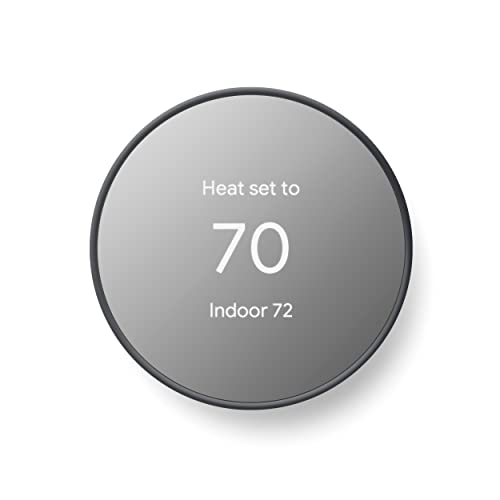
Electronic Home Thermostat
A practical guide to electronic home thermostats: how they work, which features actually matter, how to program them for comfort and efficiency, and how to choose the right model for your heating and cooling system.
START LEARNINGQuick answer: An electronic home thermostat replaces the mechanical dial or mercury switch with digital sensors and a microcontroller. It reads room temperature more precisely, holds a setpoint accurately, and adds scheduling, fan control, and often Wi-Fi connectivity. The result is steadier comfort and less wasted runtime on your heating and cooling equipment. This guide explains the technology, the feature tiers, and the installation and programming details that determine whether a thermostat performs well in real use.
What Is an Electronic Home Thermostat?
An electronic home thermostat is a control device that monitors indoor air temperature with a digital sensor and switches heating, cooling, or fan operation on and off to hold a chosen setpoint. Unlike a mechanical thermostat, which relies on a bimetallic coil or a mercury bulb, an electronic model uses solid-state sensing and a relay or triac output to signal the HVAC equipment.
Because the sensing and switching are digital, the unit can do more than hold a single temperature. Most electronic models support weekday and weekend schedules, adjustable temperature differentials, fan-only operation, and short-cycle protection. Many modern versions add Wi-Fi, remote sensors, and app-based control, which is why buyers researching an electronic home thermostat usually need to decide how much automation they actually want.
How Electronic Thermostats Work
The core of an electronic thermostat is a temperature sensor, a small processor, and a switching output. The processor compares the measured room temperature to the setpoint and decides whether to call for heating, cooling, or neither. A built-in delay prevents the compressor from short-cycling when the setpoint changes quickly.
- Temperature sensing: A thermistor reads the room temperature continuously. Better models calibrate for internal heat generated by the electronics themselves.
- Setpoint logic: The unit compares measured temperature against the setpoint and applies a differential so the equipment does not toggle constantly.
- Switching output: Relays or triacs energize the appropriate terminal — usually R to W for heat, R to Y for cooling, and R to G for fan.
- Power source: Most electronic thermostats draw power from the 24-volt control circuit (the C-wire). Battery-powered models exist for older wiring without a C-wire.
- Display and interface: A digital display and button or touch interface handle setpoint, mode, and schedule entry.
The wiring terminals are the practical constraint on any upgrade. A thermostat is only as capable as the wires behind it, which is why a licensed HVAC contractor is often the right person to confirm compatibility before purchase.
Why Upgrade to an Electronic Thermostat?
The benefits are practical rather than cosmetic. A precise digital sensor and a programmable schedule reduce unnecessary runtime, while the interface makes it easier to adjust settings for comfort and efficiency.
More Accurate Temperature Control
Digital sensing and tight setpoint logic keep the room closer to the temperature you selected, without the swing of a mechanical dial.
Precision controlProgrammable Schedules
Set different temperatures for waking hours, away periods, and sleep. The system relaxes the setpoint when the house is empty or the occupants are asleep.
SchedulingCompressor Protection
Built-in short-cycle delays protect the compressor from rapid on-off cycling that shortens equipment life.
Equipment protectionFan Control
Independent fan settings let you circulate air without running the compressor, which helps with temperature stratification and air mixing.
Air circulationRemote Access
Wi-Fi models allow adjustment from a phone, useful for changing plans or pre-cooling a home before arrival.
Connected controlFilter and Maintenance Reminders
Many models track runtime and remind you when to change the filter, supporting routine maintenance.
Maintenance supportTypes of Electronic Thermostats
Electronic thermostats fall into a few broad categories. The right choice depends on your wiring, your HVAC equipment, and how much control you want.
| Type | Best For | Key Consideration |
|---|---|---|
| Non-programmable digital | Simple single-setpoint control | Straightforward replacement; no scheduling |
| Programmable electronic | Homes with regular daily routines | Requires thoughtful schedule entry to deliver benefit |
| Wi-Fi smart thermostat | Remote access and learning features | Needs a C-wire or a compatible power adapter |
| Line-voltage electronic thermostat | Electric baseboard and radiant heat | Different wiring standard from low-voltage HVAC |
Homeowners with heat pumps need a model that explicitly supports multi-stage or auxiliary heat, so the thermostat can stage the system correctly. The operating logic for heat pumps is explained in our guide to heat pump vs air conditioner.
Key Features Worth Comparing
Feature lists can look similar across models. These are the differences that affect day-to-day comfort and equipment reliability.
- Compatibility: Confirm the thermostat supports your system type — single-stage, multi-stage, heat pump with auxiliary heat, or dual fuel. Incompatibility is the most common reason a replacement fails.
- C-wire requirement: Wi-Fi models usually need a continuous 24-volt power source. Check the control board before assuming one is present.
- Terminal count: Count the labeled wires at the existing thermostat and match them to the new unit's terminal labels. Photograph the wiring before removal.
- Scheduling depth: Some models support only a few daily periods; others allow many. More flexibility is not always better if the interface is hard to use.
- Remote sensors: Useful for rooms that run warmer or colder than the thermostat location, such as bedrooms or upper floors.
- Display readability: Backlit, high-contrast displays matter more than screen size. Check readability at a glance before committing to a touchscreen interface.
- Geofencing: Some smart models use phone location to relax setpoints when nobody is home. Accuracy varies by model.
If your home uses a split system with separate heating and cooling equipment, the thermostat must coordinate both stages. The configuration details are discussed in our guide to heating and air conditioning split system.
Installation Considerations
Replacing a thermostat is often a short job, but it involves low-voltage wiring and control-board compatibility. A few minutes of preparation prevent most problems.
- Turn off power at the air handler or furnace before touching the wiring. The 24-volt circuit is low voltage but still live.
- Photograph the existing wiring and label each wire before disconnecting it. Wire colors are not always standard between installers.
- Confirm the new terminal labels match the old ones. Letters are the reference point, not colors.
- Check for a C-wire. If absent, some smart models ship with a power adapter or can be configured to share a wire, but the trade-offs vary by model.
- Run a system test after installation to verify that heating, cooling, and fan each respond to the correct call.
If you are not comfortable working inside the control board, a qualified HVAC technician can complete the swap and verify operation. For broader system service questions, our overview of furnace and air conditioning service is a useful reference.
Programming for Comfort and Efficiency
A programmable thermostat only delivers its benefit if the schedule matches how the home is actually used. A schedule copied from a generic template often results in the home being uncomfortable when people are present and comfortable when it is empty.
- Start with real occupancy patterns. Note when the house is empty on weekdays and when occupants sleep. Build the schedule around those blocks.
- Avoid large setback swings. A very deep setback can force the system to run continuously at recovery, which reduces comfort and may not save much overall.
- Use the fan-only setting for air mixing. Running the fan without heating or cooling helps distribute air in multi-level homes and reduces temperature stratification.
- Adjust the temperature differential. A slightly wider differential reduces short cycling, while a tighter one keeps the room closer to the setpoint.
- Revisit the schedule seasonally. Heating and cooling recovery times differ, so the schedule that works in summer may need adjustment for winter.
The same principles apply whether the thermostat controls a furnace, a heat pump, or a mini-split system. Homeowners managing a ductless system should read our guide to ductless heating and air conditioning systems, since zone controllers and thermostats interact differently in that setup.
Common Mistakes to Avoid
- Buying before checking compatibility. Multi-stage and heat pump systems need thermostats that support the extra terminals and staging logic.
- Ignoring the C-wire question. Many Wi-Fi models will not operate reliably without continuous power.
- Mounting the thermostat in a poor location. Direct sun, supply registers, or exterior walls skew the sensor reading.
- Setting an overly aggressive schedule. Deep setbacks can extend recovery time and reduce comfort during occupied hours.
- Skipping the post-installation system test. A wire swapped during installation can leave heating or cooling inoperable until discovered.
Frequently Asked Questions
Do I need a C-wire for an electronic thermostat?
Not all electronic thermostats need one. Battery-powered models operate without a C-wire, and some smart models include adapters that provide continuous power. However, Wi-Fi models generally require a stable 24-volt supply, so confirm the control board has a C terminal or that the kit includes a workaround.
Can I install an electronic thermostat myself?
Many homeowners can replace a like-for-like thermostat by photographing the wiring, matching terminal labels, and turning off power first. Installation becomes more involved when the system is multi-stage, uses a heat pump with auxiliary heat, or lacks a C-wire. In those cases, professional installation is safer.
Will an electronic thermostat reduce energy use?
The savings come from schedule discipline, not the device itself. A programmable thermostat that relaxes the setpoint when the home is empty and at night can reduce runtime. A smart model with remote access adds convenience, but the schedule and setback strategy do the actual work.
Do electronic thermostats work with heat pumps?
Yes, but the model must be explicitly rated for heat pump systems. It needs to control the reversing valve and, where present, auxiliary or emergency heat. A standard single-stage thermostat will not operate a heat pump correctly.
What is the difference between programmable and smart thermostats?
A programmable thermostat follows a schedule you enter manually. A smart thermostat adds connectivity, app control, and often learning or geofencing features that adjust the schedule automatically. Both are electronic; the distinction is the level of automation and remote access.
Bottom Line
An electronic home thermostat is a small upgrade with a large effect on daily comfort. The biggest gains come from a model that matches your HVAC system, a well-thought-out schedule, and a clean installation that respects the control wiring.
Choose features by how you actually live: a simple programmable model is enough for many homes, while a smart model adds value for households with variable routines or multiple zones. Whichever tier you pick, confirm compatibility first, then plan the schedule around real occupancy patterns. Review our recommended models below to take the next step.