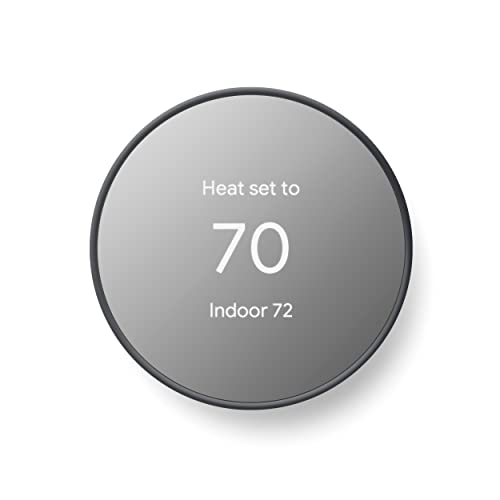
WiFi Air Conditioner Thermostat: The Complete Smart Cooling Guide
Discover how WiFi-enabled thermostats transform your air conditioning experience with remote control, intelligent scheduling, and energy-aware cooling — everything you need to know before upgrading your home comfort system.
Why this guide matters: If you are researching WiFi air conditioner thermostats, you already understand that a smarter thermostat can improve comfort and convenience. This guide walks you through how these devices work, what features matter most, which tier fits your HVAC setup, and how to install one correctly — so you can make a confident, informed decision before you buy.
What Is a WiFi Air Conditioner Thermostat?
A WiFi air conditioner thermostat is a smart control device that manages your cooling system while connecting to your home's wireless network. Unlike a traditional thermostat that only responds to manual input, a WiFi model lets you adjust temperature settings, build schedules, and monitor energy usage from a smartphone app — whether you are in the next room or away from home entirely.
These thermostats communicate with your central AC, heat pump, or compatible ductless system through low-voltage wiring (typically including a C-wire for continuous power). The WiFi connection bridges your HVAC equipment and the cloud, enabling remote access, voice assistant integration, and automatic adjustments based on occupancy or weather data. For a broader look at connected cooling devices, explore our WiFi air con overview.
How WiFi Thermostats Work With Your AC System
A WiFi thermostat acts as the command center for your cooling equipment. Here is the basic flow:
- Sensor reading: The thermostat measures ambient room temperature and compares it to your setpoint.
- Signal to HVAC: When cooling is needed, it sends a low-voltage signal to turn on the compressor and air handler.
- Cloud connection: The device syncs with your home WiFi router, relaying data to a mobile app and receiving commands from you.
- Smart adjustments: Built-in algorithms learn your schedule, detect occupancy, and optimize run times to reduce unnecessary cooling cycles.
For homes using a heat pump system, a WiFi heat pump thermostat adds heating-season logic to the same remote-control convenience. If your system is heating-only, a WiFi heat only thermostat serves that specific purpose.
Key Benefits of a Smart WiFi Thermostat
Remote Control
Adjust your AC from anywhere using a smartphone app. Arrive home to a perfectly cooled space without running the system all day.
Intelligent Scheduling
Create custom cooling schedules for weekdays, weekends, and vacations. Many models learn your patterns and adapt automatically.
Energy Awareness
Track runtime and usage trends. Smart setbacks and geofencing reduce wasted cooling when nobody is home.
Voice Assistant Support
Works with popular voice platforms so you can change temperature hands-free using simple spoken commands.
System Alerts
Receive notifications about filter changes, abnormal runtimes, or connectivity issues before they become comfort problems.
Multi-User Access
Share control with family members through separate app accounts, each with their own preferences and schedules.
Advantages and Considerations Before You Upgrade
Advantages
- Convenient remote access from anywhere
- Better schedule control than manual thermostats
- Useful usage insights for long-term efficiency
- Voice control and smart-home integration
- Automatic setbacks when you are away
Considerations
- Requires stable home WiFi and a compatible HVAC system
- May need a C-wire or adapter for continuous power
- Initial setup can take longer than a basic thermostat
- App and firmware quality vary between brands
- Not all window or portable AC units are directly compatible
Compatibility: Will a WiFi Thermostat Work With Your AC?
Compatibility is the most important check before purchasing. Traditional WiFi thermostats are engineered for central air conditioning, heat pumps, and some ducted systems. They rely on standard low-voltage wiring (R, G, Y, W, and often C terminals) to control the equipment.
If your home lacks a C-wire, you may need a model designed to work without one. Our guide on WiFi thermostat without C-wire required explains the adapters and power-sharing options available. For a detailed breakdown of device types, see our WiFi HVAC thermostat resource.
Quick Compatibility Reference
| HVAC System | Typical Compatibility | Notes |
|---|---|---|
| Central Air Conditioning | High — designed for this | Standard 24V wiring, often needs C-wire |
| Heat Pump (cooling + heating) | High — with heat pump model | Requires O/B terminal support for reversing valve |
| Ductless Mini-Split | Varies | Many mini-splits use proprietary controls; check manufacturer |
| Window AC Unit | Low — not directly compatible | Use smart plug or unit with built-in WiFi instead |
| Portable AC | Low — not directly compatible | Smart plug or app-enabled unit is the practical route |
Window and portable AC owners can still gain smart control through other approaches. If you are working with a window unit, our guide on a window air conditioner with thermostat covers built-in control options, while a window air conditioner with remote thermostat explains remote sensing accessories.
Essential Features to Look For
- Geofencing: Automatically switches to an away schedule when your phone leaves the area, then resumes comfort settings when you return.
- 7-day programmable scheduling: Separate schedules for each day of the week give you precise control over cooling periods.
- Remote sensor support: Some models accept auxiliary room sensors to balance temperature across multiple zones.
- Usage reports: Historical runtime and cycle data help you identify patterns and adjust schedules for better efficiency.
- Voice integration: Support for major voice assistants lets you adjust settings without touching the app.
- OTA firmware updates: Over-the-air updates keep the device secure and add features over time.
- Local fallback control: A quality thermostat still works manually if WiFi goes down.
If your goal is purely to control cooling through a connected device, our article on a WiFi thermostat for air conditioner provides additional context on matching features to your AC type.
Choosing the Right Tier for Your Needs
WiFi thermostats fall into recognizable tiers based on features and build. Use these descriptions to match a model to your expectations — no absolute figures involved.
Essential WiFi Control
Entry-level smart thermostats deliver the core promise: app-based remote control, basic scheduling, and WiFi connectivity. They typically offer a straightforward interface and reliable temperature management. These models suit households that want remote access without extra sensors or advanced learning features. The build is generally solid for the category, and they represent a sensible starting point for first-time smart thermostat buyers.
Balanced Smart Features
Mid-range thermostats add features that meaningfully improve daily use: geofencing, detailed usage reports, multi-user app access, and broader voice assistant compatibility. Build quality is noticeably refined, with better displays and more responsive interfaces. This tier is well-specified for most central AC and heat pump owners who want a capable, long-term device without stepping into professional-grade territory.
Advanced Whole-Home Intelligence
Top-tier thermostats support remote room sensors, advanced occupancy detection, zoning coordination, and deeper smart-home automation. They are built with premium materials and offer the most polished app experience in the category. For homes with multiple zones or complex HVAC setups, this tier provides the most complete feature set. These models are a worthwhile investment for households that prioritize comfort precision and long-term flexibility.
When comparing models, remember that a higher tier does not automatically mean a better fit. An entry-level device from a reputable brand can be a solid choice for a straightforward central AC system, while a top-tier model may be over-specified for a small apartment with a single window unit. Match the tier to your actual system and usage patterns.
Installation Basics and Setup Tips
Most WiFi thermostat installations follow a predictable sequence: power down the HVAC system at the breaker, photograph the existing wiring, label each wire, remove the old thermostat base, mount the new base plate, reconnect wires to matching terminals, attach the display unit, restore power, and complete the in-app setup.
Key installation considerations:
- C-wire availability: Confirm whether your system has a spare conductor for the C terminal. If not, choose a model with an included power adapter or a kit designed for C-wire-less setups.
- Wire labeling: Take a clear photo before disconnecting anything. Terminal labels vary slightly between brands, and mislabeling is the most common DIY error.
- WiFi signal strength: The thermostat location should receive a reliable 2.4 GHz signal, which is the standard band for most HVAC smart devices.
- Firmware update: After installation, complete any available firmware updates before fine-tuning schedules.
For homes with ductless systems and no thermostat wiring, a WiFi heat pump thermostat may still be compatible if the indoor unit supports wired controllers. Always verify with the equipment manual or a qualified technician.
Smart Cooling Beyond Central Systems
Not every home has ductwork, and not every AC unit accepts a wired thermostat. If you cool with window units, portable units, or a mix of room-level equipment, you can still build a smart cooling setup:
- WiFi-enabled window AC: Some modern window units include built-in WiFi and app control, making a separate thermostat unnecessary. See our WiFi air con overview for connected options.
- Smart plugs with window AC: A smart plug can turn a standard window unit on and off remotely, though temperature regulation remains manual.
- AC units with remote thermostats: Certain window models accept a remote temperature sensor for more accurate room readings. Our window air conditioner with remote thermostat article covers this category.
For whole-home cooling that integrates with a WiFi thermostat, a whole house air conditioning system offers the most seamless compatibility and control.
WiFi Thermostat vs Traditional Thermostat
| Feature | Traditional Thermostat | WiFi Air Conditioner Thermostat |
|---|---|---|
| Remote access | None — manual only | Full app control from anywhere |
| Scheduling | Basic or none | 7-day programmable with learning options |
| Usage insights | Not available | Runtime reports and trend data |
| Voice control | No | Works with major voice assistants |
| Geofencing | No | Often included in mid-tier and above |
| Setup complexity | Simple | Moderate — requires app and WiFi setup |
Ready to Upgrade Your Cooling Control?
Compare WiFi thermostat options and find the right fit for your AC system. Explore features, tiers, and compatibility in one place.
View Recommended WiFi ThermostatsFrequently Asked Questions
Do I need a C-wire for a WiFi air conditioner thermostat?
Most WiFi thermostats require a C-wire for continuous power. If your system lacks one, some models include adapter kits or power-sharing designs. Check your current thermostat wiring before choosing a model, and review options designed for C-wire-less installations if needed.
Can I use a WiFi thermostat with a window AC unit?
Standard WiFi thermostats are built for central HVAC systems and are not directly compatible with window units. However, you can achieve remote control by choosing a window AC with built-in WiFi or by using a smart plug. Our window air conditioner with thermostat guide explains the alternatives.
Will a WiFi thermostat work if my internet goes down?
Yes. The thermostat continues to operate locally, maintaining your schedule and setpoints even without internet. Remote app access and voice control are temporarily unavailable until the connection returns.
How does geofencing improve cooling efficiency?
Geofencing uses your phone's location to detect when you leave home. The thermostat switches to an away setpoint, reducing cooling while the space is empty, and returns to your comfort setting when you are heading back. This minimizes wasted runtime without manual schedule changes.
Can one WiFi thermostat control multiple AC zones?
A single thermostat controls one zone. For multi-zone homes, you need either multiple thermostats or a zoning system that coordinates dampers with a master controller. Top-tier models sometimes integrate with zoning panels for centralized management.
Is professional installation required?
Many homeowners install WiFi thermostats themselves, especially when replacing an existing thermostat with matching wiring. If your system uses unusual wiring, lacks a C-wire, or involves a heat pump with complex staging, a qualified HVAC technician can ensure correct setup and safe operation.
Final Thoughts: Is a WiFi Thermostat Right for You?
A WiFi air conditioner thermostat is a practical upgrade for anyone who wants more control, better scheduling, and useful usage insights from their cooling system. The technology is mature, the app ecosystems are well-developed, and the range of tiers means there is a suitable model for most central AC and heat pump setups.
Before you buy, confirm three things: your HVAC system compatibility, your wiring situation (especially C-wire availability), and your must-have features. Entry-level devices handle the basics well; mid-tier models add geofencing and richer reports; top-tier options bring advanced sensors and zoning support. Match the tier to your home and routine, and a WiFi thermostat will deliver reliable, convenient cooling control for years.
If you are still exploring related smart cooling options, browse our guides on WiFi thermostat for air conditioner setups and C-wire-free WiFi thermostats for more detail.