Mini Split Wi-Fi Thermostat: Smart Comfort Control for Ductless Systems
A complete research guide to understanding Wi-Fi thermostat options for ductless mini split systems — compatibility, features, installation considerations, and how to choose the right control for your home.
A mini split Wi-Fi thermostat is a control device that connects your ductless heating and cooling system to your home network, allowing you to adjust settings, create schedules, and monitor operation from a smartphone or smart home platform. Unlike conventional thermostats designed for forced-air systems, mini split thermostats must communicate with the specific control protocol used by the indoor unit — which is why compatibility is the single most important factor in this category.
This guide is written for homeowners and researchers who have already identified a ductless system as their preferred solution and now need to understand the control layer. You will learn how mini split thermostats differ from standard thermostats, which features matter most, how to evaluate compatibility, and what to expect from installation. For broader context on ductless systems themselves, see our single-zone ductless mini split guide and our overview of mini splits without a heat pump.
How a Mini Split Wi-Fi Thermostat Works
Conventional thermostats use low-voltage wiring (typically 24V) to signal a furnace or air handler. Mini split systems are different: most ductless indoor units use proprietary communication between the indoor and outdoor units, and the wall-mounted remote or wired controller is often a dedicated accessory rather than a universal 24V device. A Wi-Fi thermostat for mini splits typically falls into one of three categories:
- Manufacturer Wi-Fi controllers: Brand-specific wired or wireless controllers that communicate natively with the indoor unit. These offer the highest compatibility and often expose full feature sets, including fan speed, louver control, and diagnostic codes.
- Third-party thermostats with an adapter or interface module: Some manufacturers offer a gateway or adapter that translates standard thermostat signals into the mini split's protocol. This allows use of popular smart thermostats, but feature support may be limited.
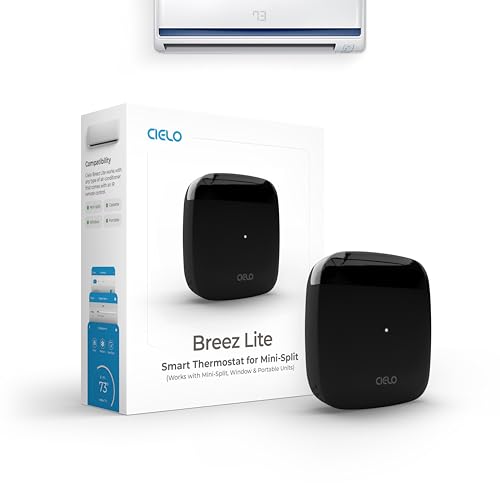
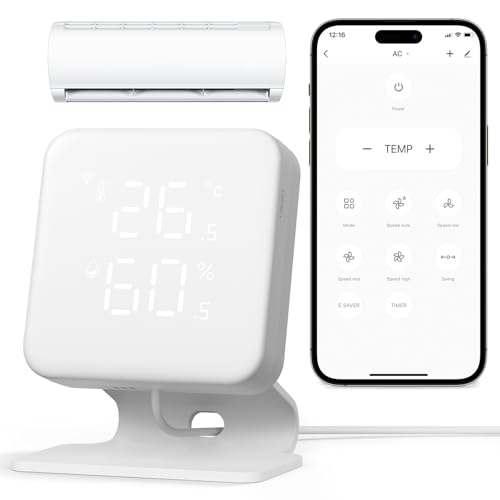
- IR-based smart controllers: Devices that emulate the infrared remote control signals and add Wi-Fi connectivity. These are typically the most straightforward retrofit option, though they rely on line-of-sight and may not support every function.
Understanding which category applies to your system is essential before comparing models. A thermostat that works perfectly on one brand may be entirely incompatible with another. For related control topics, our thermostat guide covers general thermostat selection principles, while our variable speed air conditioner article explains why precise control matters for inverter-driven systems.
Key Features to Compare
Not all Wi-Fi thermostats for mini splits are created equal. The feature set you need depends on your priorities — convenience, energy management, or integration with a broader smart home ecosystem. The following grid summarizes the most important categories.
App Control & Remote Access
Adjust temperature and modes from anywhere. Look for responsive apps with clear status reporting and multi-user support.
Scheduling & Geofencing
Programmable schedules and location-based automation reduce runtime when rooms are unoccupied.
Compatibility & Adapters
Confirm whether the thermostat communicates natively, requires an adapter, or uses IR emulation.
Smart Home Integration
Support for voice assistants and platforms such as Alexa, Google Home, or Apple HomeKit varies widely.
Energy Reporting
Usage history and runtime summaries help identify inefficiencies and validate scheduling strategies.
Display & Local Control
A clear wall display and physical controls remain valuable when the network is unavailable.
For households with multiple zones, consider whether the thermostat supports multi-zone management or whether each indoor unit requires its own controller. Our whole house AC system guide explains zoning concepts that apply to multi-head mini split configurations.
Compatibility: The Most Important Decision
Compatibility determines whether a Wi-Fi thermostat will work at all, and if it does, which functions remain accessible. Before comparing features, verify the following:
- Indoor unit model and control protocol: Check the installation manual for thermostat terminals, communication ports, or supported accessory controllers.
- Adapter or gateway availability: Some brands offer official interfaces for third-party thermostats; others do not.
- Feature limitations: Third-party thermostats may control temperature and mode but not fan speed, louver position, or specialized dehumidification modes.
- Warranty implications: Unapproved accessories or improper wiring can affect warranty coverage. Confirm with the manufacturer or a licensed technician.
Installation complexity also varies. IR-based controllers are often the simplest retrofit, while wired thermostats with adapters may require low-voltage wiring and configuration. For installation-related guidance, see our HVAC installation resource and our article on local heating and air conditioning companies for contractor selection.
Comparing Thermostat Tiers
Mini split Wi-Fi thermostats can be grouped into broad tiers based on capability and integration depth. The table below uses universal tier descriptors rather than specific figures, so the comparison remains useful over time.
| Tier | Typical Characteristics | Best For |
|---|---|---|
| Essential tier | Basic app control, simple scheduling, IR-based communication, limited smart home integration | Renters and single-room setups seeking straightforward remote control |
| Balanced tier | Native or adapter-based communication, geofencing, energy reporting, voice assistant support | Homeowners who want reliable scheduling and moderate automation |
| High-end tier | Full feature access, multi-zone management, advanced diagnostics, deep smart home integration | Multi-zone homes and users building a connected comfort ecosystem |
| Professional-grade | Commercial-oriented controls, centralized management, robust reporting, installer configuration tools | Light commercial spaces and property managers overseeing multiple units |
Higher tiers generally offer smoother integration and more complete access to the mini split's capabilities, but the right choice depends on your system's compatibility and your actual usage patterns. A balanced-tier thermostat with native support often delivers a better experience than a high-end tier model limited by an adapter.
Installation and Setup Considerations
Before installing a Wi-Fi thermostat, plan for the following:
- Power source: Confirm whether the thermostat draws power from the indoor unit, batteries, or a separate adapter.
- Wiring: Wired thermostats may require low-voltage connections; improper wiring can damage control boards.
- Network reliability: A stable 2.4 GHz Wi-Fi network is often required; some devices do not support 5 GHz bands.
- Firmware updates: Ensure the thermostat and any adapter receive current firmware for security and feature support.
- Professional assistance: For wired installations or adapter-based setups, a licensed HVAC technician is recommended.
If you are also evaluating the electrical side of your system, our guides on 110V vs 240V air conditioners and single-phase to three-phase converters provide useful context. For maintenance planning, see our HVAC cleaning and service resource.
Maintenance and Troubleshooting Basics
Wi-Fi thermostats are low-maintenance, but a few habits keep them reliable:
- Keep the thermostat display and sensors free of dust and obstructions.
- Monitor app connectivity and re-pair devices after router changes.
- Check for firmware updates periodically.
- If the system stops responding, verify that the indoor unit is receiving power and that the thermostat's communication method (wired, adapter, or IR) is functioning.
If your system runs but airflow is weak, our article on an air conditioner running but not blowing air covers common causes. For broader system reliability, see our guide to the most reliable mini split brands.
Frequently Asked Questions
Can any Wi-Fi thermostat work with a mini split system?
No. Mini split systems often use proprietary communication protocols, so compatibility depends on the brand and model. Some systems support third-party thermostats through an adapter or interface module, while others require a manufacturer-specific Wi-Fi controller. Always verify compatibility with the system's installation manual or a qualified technician before purchasing.
Does a mini split Wi-Fi thermostat improve energy efficiency?
A Wi-Fi thermostat can improve efficiency by enabling precise scheduling, geofencing, and remote adjustments that reduce unnecessary runtime. However, actual savings depend on usage patterns, insulation, system sizing, and the thermostat's compatibility with the mini split's inverter controls.
Do I need professional installation for a mini split Wi-Fi thermostat?
Many Wi-Fi thermostats require low-voltage wiring knowledge and an understanding of the mini split's control interface. If the thermostat uses an adapter or communicates directly with the indoor unit, professional installation is recommended to avoid voiding warranties or damaging control boards.
What is the difference between a Wi-Fi thermostat and a remote control for a mini split?
A remote control operates the unit locally via infrared, while a Wi-Fi thermostat enables app-based control, scheduling, automation, and remote access from anywhere. Some Wi-Fi thermostats also integrate with smart home platforms and provide detailed energy usage data.
Choosing the Right Control for Your Ductless System
The right mini split Wi-Fi thermostat is the one that matches your system's communication protocol, exposes the features you actually use, and fits your smart home ecosystem. Start with compatibility, then compare scheduling, automation, and reporting capabilities. If you are still evaluating the system itself, our mini air conditioner for room guide and space-saving air conditioner overview can help frame the broader decision.
Once you have confirmed compatibility and feature priorities, the product recommendations below provide a practical starting point for comparing available options.