Why a Window AC Thermostat Upgrade Is Worth Considering
Most window air conditioners ship with a basic internal thermostat that senses return air temperature a few inches from the evaporator coil. This design works, but it is inherently imprecise. The unit may run longer than needed, cycle on and off rapidly, or leave the far side of the room noticeably warmer. An external thermostat placed in the living zone gives the compressor a true picture of room conditions.
The practical benefits are easy to describe without exaggeration. You get steadier temperatures, fewer manual knob adjustments, and the ability to schedule cooling around occupancy. For anyone who has ever woken up freezing because the AC kept running after the room cooled, an external thermostat is a straightforward fix. It also pairs naturally with broader summer heating and cooling strategies that keep the whole home balanced.
Before buying anything, confirm what kind of control your window unit already uses. Mechanical units with rotary knobs and electronic units with digital displays behave very differently when paired with external controls. That single distinction determines which thermostat category will actually work.
Types of Thermostats Compatible With Window AC Units
Window air conditioners operate on line voltage, typically 120V for smaller units and 240V for larger ones. This is the critical technical fact: standard low-voltage thermostats designed for central HVAC systems will not directly control a window AC. Instead, you choose from several dedicated categories.
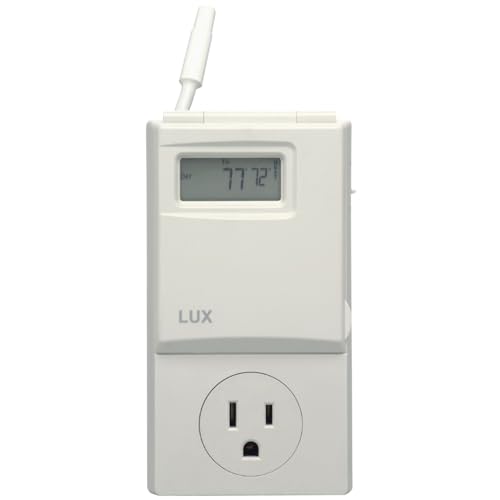
1. Plug-In Line-Voltage Thermostat Controllers
These devices sit between the wall outlet and the AC plug. The thermostat measures room temperature and switches power to the unit on and off based on your setpoint. They are the most widely compatible option because they require no wiring changes and work with both mechanical and electronic window units, provided the unit resumes cooling automatically when power returns.
Look for models with a remote temperature sensor or a sensor on a cable so the thermostat reads the room rather than the outlet wall. Plug-in controllers are generally mid-tier in build quality, with premium options adding scheduling, backlit displays, and compressor delay protection.
2. Smart Plugs With Temperature Automation
A smart plug paired with a separate temperature sensor and a home automation hub can approximate thermostat behavior. You create an automation rule: when the room sensor exceeds the target, turn the plug on; when it drops below, turn it off. This approach is flexible and integrates with voice assistants and phone apps.
The catch is that smart plugs are not purpose-built thermostats. They lack native compressor protection logic and depend on cloud or hub reliability. They work best for entry-level setups where convenience matters more than precision, and for users already invested in a smart home ecosystem.
3. Built-In Thermostat Ports and Adapters
Some higher-end window units include a dedicated thermostat terminal or accessory port. In these cases, the manufacturer sells a matching wall thermostat or a wired remote that connects directly. This is the cleanest integration because the unit's own control board handles compressor timing and fan logic.
Availability is limited to specific brands and models, so check your owner's manual before assuming a port exists. When it does exist, this is the most reliable path and typically lands in the premium or flagship tier depending on the thermostat's feature set.
4. Line-Voltage Wall Thermostats (Wired)
Hardwired line-voltage thermostats are common in through-the-wall and built-in AC installations. They are less practical for a standard plug-in window unit because they require cutting the power cord or installing a dedicated circuit. For permanent installations, though, they deliver the most polished result and integrate cleanly with the unit's power feed.
If your setup is closer to a built-in configuration, the same principles apply as with through-the-wall AC systems, where line-voltage thermostats are the norm rather than the exception.
| Thermostat Type | Best For | Wiring Needed | Typical Tier |
|---|---|---|---|
| Plug-in line-voltage controller | Standard window units, renters, quick upgrades | None (plug between outlet and AC) | mid-range |
| Smart plug + temperature sensor | Smart home users wanting app and voice control | None | entry-level |
| Manufacturer thermostat port / adapter | Units with a dedicated thermostat terminal | Low-voltage or proprietary connection | premium |
| Wired line-voltage wall thermostat | Permanent built-in and through-the-wall installs | Requires line-voltage wiring | flagship |
Compatibility check: Before buying a plug-in controller, test whether your window AC resumes its previous settings when power is restored. Turn the unit on, unplug it, wait ten seconds, and plug it back in. If it stays off or resets to defaults, a plug-in thermostat will not work reliably without an auto-restart feature.
How to Match a Thermostat to Your Window AC Unit
Compatibility is the single most common reason thermostat upgrades disappoint. Work through these checks in order before committing to any product.
- Identify the control type. Mechanical knobs indicate a simple on/off power circuit. Digital displays usually mean electronic controls with possible auto-restart and memory.
- Check the voltage and amperage. Confirm whether the unit runs on 120V or 240V and note the rated amps on the nameplate. The thermostat controller must meet or exceed both.
- Test auto-restart behavior. As described above, unplug and replug the unit while it is running. If it resumes cooling, a plug-in controller is viable.
- Look for a thermostat port. Scan the manual and the unit's control panel for a terminal labeled thermostat, remote, or accessory.
- Measure the plug type. Some plug-in controllers support only specific plug shapes (5-15P, 6-15P, 6-20P). Match the controller's socket to your AC's plug.
- Confirm sensor placement options. A remote sensor or cabled sensor prevents the thermostat from reading heat radiating from the outlet or the AC itself.
If your unit is an inverter model with variable-speed operation, note that simple on/off plug-in controllers defeat the purpose of inverter technology. Inverter units modulate compressor speed continuously, and cutting power interrupts that modulation. For those units, a manufacturer-provided thermostat or smart integration is the better route. The same logic applies to advanced inverter AC systems in general.
Key Features That Separate Good Thermostats From Great Ones
Once compatibility is settled, feature differences determine daily satisfaction. The list below reflects what actually matters in a window AC context, not marketing checkboxes.
- Remote temperature sensing: A sensor away from the outlet and the unit produces accurate readings and prevents short cycling.
- Compressor delay protection: A short delay before restarting protects the compressor from rapid cycling and extends unit life.
- Programmable schedules: Seven-day or five-two schedules align cooling with occupancy and reduce wasted runtime.
- Adjustable swing differential: A wider differential means longer, gentler cycles; a tighter one means steadier temperature but more cycling.
- Backlit display and simple controls: Readability at night and low-friction adjustments matter more than most buyers expect.
- Power-failure memory: The thermostat should retain settings after an outage rather than resetting to defaults.
- Load rating headroom: Choose a controller rated comfortably above your unit's amperage for cooler operation and longer service life.
For units in bedrooms and home offices, quiet operation and precise low-speed control are especially valuable. Pairing a thermostat upgrade with a well-chosen unit matters too; our guidance on the most efficient window air conditioner explains how efficiency ratings interact with real-world control behavior.
Installation and Setup: What to Expect
Plug-in thermostat controllers are genuinely plug-and-play. You place the controller on a nearby surface or mount it on the wall, plug the AC into the controller, plug the controller into the outlet, set the target temperature, and let it run. Setup takes minutes and requires no tools beyond perhaps a screwdriver for wall mounting.
Wired line-voltage thermostats require more care. The circuit must be de-energized at the breaker, the thermostat must be rated for the circuit's voltage and amperage, and the wiring must follow local electrical codes. If you are not comfortable working inside a junction box, hire a licensed electrician. The safety margin is not worth improvising.
Smart plug setups fall between the two. The hardware install is trivial, but automation configuration takes trial and error. Expect to tune temperature thresholds and delay timers over the first week to avoid rapid toggling.
Placement tip: Mount or place the thermostat roughly four to five feet above the floor, away from direct sunlight, lamps, computers, and the AC's own discharge air. These simple adjustments prevent the thermostat from reading a false temperature and running the compressor unnecessarily.
Common Mistakes to Avoid
Most thermostat frustrations trace back to a handful of avoidable errors. Understanding them in advance saves time and returns.
- Buying a low-voltage thermostat: Central HVAC thermostats run on 24V and will not switch a 120V or 240V window AC circuit.
- Ignoring the auto-restart requirement: A thermostat cannot cool a unit that stays off after power returns.
- Mounting the sensor near the AC: The thermostat then reads discharge air instead of room air and cycles incorrectly.
- Exceeding the controller's amperage rating: Undersized controllers run hot and fail early.
- Using on/off control with inverter units: This defeats modulation and can shorten compressor life.
- Skipping compressor delay settings: Rapid restart cycles stress the compressor and waste energy.
If you notice the AC behaving erratically after installation, the problem is often a settings mismatch rather than faulty hardware. Our troubleshooting reference on troubleshooting air conditioning covers the diagnostic sequence in detail.
Thermostat Upgrades in the Broader Cooling Plan
A window AC thermostat is one component of a larger comfort strategy. Sealing gaps around the unit, shading west-facing windows, and using ceiling fans in tandem all reduce the load the compressor must handle. These measures make thermostat precision more effective because the unit has less work to do and reaches setpoint faster.
For households evaluating multiple cooling options, the thermostat decision often overlaps with equipment choice. Comparing spot coolers and other targeted solutions helps clarify where a window unit with a smart thermostat fits best. When a portable unit is under consideration instead, the same thermostat categories apply, though the plug and voltage details differ; see our stand-alone air conditioner units overview for context.
Renters and temporary setups benefit most from plug-in controllers because they leave no permanent trace. Homeowners planning long-term use may prefer wired line-voltage thermostats for a cleaner wall-mounted finish. Either way, the goal is the same: accurate sensing, protected compressor, and schedules that match real life.