Thermostat C Wire: The Complete Guide to Common Wires
Understand what a C wire does, why modern thermostats need one, and how to check, install, or troubleshoot it for reliable heating and cooling control.
Quick answer: A C wire (common wire) supplies continuous low-voltage power from your HVAC system to the thermostat. Without it, smart thermostats may struggle to stay powered, display information reliably, or maintain a stable Wi-Fi connection.
What Is a Thermostat C Wire?
A thermostat C wire — short for common wire — is the wire that completes the low-voltage electrical circuit between your thermostat and your HVAC equipment. In a typical thermostat cable, you will find wires labeled R (power), W (heat), Y (cooling), G (fan), and C (common). The C wire provides a return path for the 24-volt power that the thermostat uses to operate its display, processor, and wireless radio.
Older mechanical and basic programmable thermostats often ran on batteries and only needed to close a circuit to call for heat or cooling. The C wire was optional in many of those installations. Modern smart thermostats, however, are essentially small computers that need a constant power supply. That is why the C wire has become one of the most discussed topics in thermostat upgrades.
If you are still comparing thermostat styles and control options, it helps to understand the broader category of devices designed for heating and cooling. Our overview of a thermostat for an HVAC system explains how different models integrate with central equipment and what wiring each type expects.
How the C Wire Fits Into Your HVAC Circuit
Your HVAC system includes a step-down transformer that converts line voltage to 24 volts AC. The R wire carries that voltage to the thermostat. When the thermostat calls for cooling, it connects R to Y, which energizes the outdoor condenser. When it calls for heat, it connects R to W. The G wire controls the indoor blower. The C wire is the neutral return that lets the thermostat draw power continuously, independent of whether the system is actively heating or cooling.
Why Smart Thermostats Need a C Wire
Smart thermostats offer scheduling, remote access, energy reports, and integration with voice assistants. All of these features require a constant power source. Without a C wire, many smart models resort to power stealing — briefly drawing current through the Y or W circuit when the system is not running. While this works in some homes, it can cause short cycling, flickering displays, or unreliable Wi-Fi in others.
A dedicated C wire eliminates those problems. It gives the thermostat a stable 24-volt supply, so the device can stay connected to your network, respond quickly to commands, and run its display without draining batteries. For homeowners investing in a connected home, the C wire is the foundation of dependable thermostat performance.
Important: If your smart thermostat documentation says a C wire is required, do not ignore it. Power-stealing adapters can work in some systems, but they are not universally compatible. A proper C wire connection is the most reliable long-term solution.
How to Identify a C Wire
Before you assume your home lacks a C wire, check the existing thermostat wiring. Follow these steps carefully:
- Turn off power to your heating and cooling system at the breaker or service switch.
- Remove the thermostat cover from the wall plate. Most covers snap off or slide upward.
- Inspect the terminal labels on the wall plate. Look for a terminal marked C, COM, or Common.
- Check for a connected wire at that terminal. The wire may be blue, black, brown, or another color depending on the installer.
- Look behind the wall for unused wires tucked into the opening. Sometimes installers leave a spare conductor that can be repurposed as a C wire.
If you find a wire connected to the C terminal, you likely have a C wire available. If the terminal is empty but there is a spare wire in the bundle, you may be able to connect it. If neither is true, you will need an alternative solution.
Tip: Take a photo of the wiring before you disconnect anything. Terminal labels vary between manufacturers, and a clear photo helps you reconnect wires correctly. If you are unsure about the wiring layout, a professional HVAC technician can confirm the configuration.
Common Thermostat Wire Colors
| Terminal | Typical Wire Color | Function |
|---|---|---|
| R or RH/RC | Red | 24V power from transformer |
| C | Blue or Black | Common return for continuous power |
| W | White | Heating call |
| Y | Yellow | Cooling call |
| G | Green | Indoor blower fan |
Wire colors are a convention, not a rule. Always confirm by terminal label rather than color alone. If your system uses a heat pump, you may also see O/B terminals for reversing valve control. Our guide to a thermostat for heat pump and air conditioning covers those additional wiring considerations.
What to Do If You Do Not Have a C Wire
Many homes built before smart thermostats became common have only four wires running to the thermostat. If you do not have a C wire, you have several options. Each has trade-offs in convenience, reliability, and installation effort.
Option 1: Use a C Wire Adapter
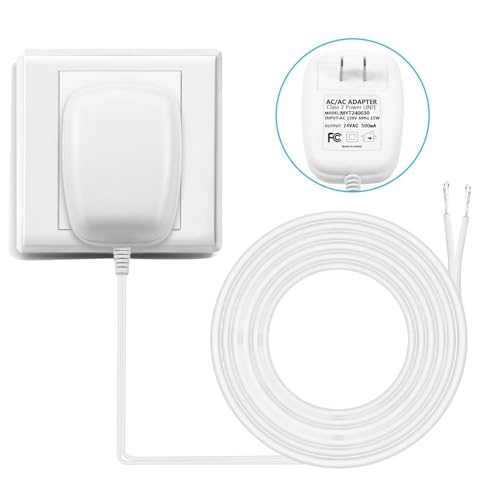
A C wire adapter kit installs at the air handler or furnace control board and repurposes existing wiring to provide a common connection at the thermostat. It is a popular solution because it avoids running new cable through finished walls. Adapter kits vary in compatibility, so check that the kit supports your equipment type and thermostat model.
Option 2: Run a New Thermostat Cable
Running a new cable with enough conductors gives you a true C wire and future-proofs the installation. This is the most robust solution, but it can be labor-intensive if the wall is finished and the route is complicated. In many homes, an HVAC technician can fish a new cable using existing pathways.
Option 3: Install a Separate Transformer
A separate 24-volt transformer can power the thermostat independently of the HVAC equipment. This approach is sometimes used in unusual configurations, but it requires careful wiring so that the thermostat and HVAC system share a common reference. It is generally a task for a qualified technician.
Option 4: Choose a Thermostat Designed for No-C-Wire Operation
Some thermostats are engineered to operate without a C wire by using power-stealing techniques or internal batteries. These models can be a practical choice for simpler systems, but they may not support every smart feature. If you are exploring thermostat options for a window unit or a split system, review our guides on a thermostat for a window AC unit and a thermostat for a split system to understand how control requirements differ.
| Solution | Best For | Considerations |
|---|---|---|
| C wire adapter kit | Homes with existing 4-wire cable and finished walls | Check compatibility with your HVAC control board |
| New thermostat cable | Long-term reliability and future upgrades | Requires routing cable; professional help often wise |
| Separate transformer | Unusual wiring situations | Needs careful common-reference wiring |
| No-C-wire thermostat | Simple systems and basic scheduling needs | Feature set may be limited; power stealing varies |
C Wire Installation Basics
If you have confirmed that a spare wire is available and you are comfortable working with low-voltage wiring, connecting a C wire can be straightforward. The general process is:
- Turn off power at the breaker and the HVAC service switch.
- Label existing wires or take a clear photo before making changes.
- Connect the spare wire to the C terminal on the thermostat wall plate.
- Connect the other end of that wire to the C terminal on the HVAC control board.
- Restore power and verify that the thermostat powers on and the system responds to heating and cooling calls.
If the control board does not have a clearly labeled C terminal, or if the wiring colors do not match conventional layouts, stop and consult a professional. Incorrect wiring can damage the transformer, the thermostat, or the control board. For homes with complex systems, a technician can confirm the correct terminal and ensure the circuit is safe.
Safety note: Low-voltage thermostat wiring is generally safe to handle when power is off, but the air handler and condenser have line-voltage components. Never work inside the equipment cabinet without shutting off the dedicated breaker. If you are uncertain at any point, hire a licensed HVAC technician.
Troubleshooting C Wire Problems
Even with a C wire installed, problems can appear. The thermostat may lose power intermittently, display a wiring error, or fail to control the system. Here are common symptoms and what they usually mean.
Thermostat Does Not Power On
Check the breaker, the HVAC service switch, and the thermostat batteries if applicable. Confirm that the C wire is securely seated at both the thermostat and the control board. A loose connection is a frequent cause of intermittent power loss.
Thermostat Displays a Wiring Error
Some smart thermostats detect wiring faults and display an error code. Recheck that each wire is connected to the correct terminal. If you recently moved wires, compare your setup to the photo you took before starting. Our article on a thermostat that is blank and AC not working walks through additional diagnostic steps for power-related failures.
System Short Cycles After Thermostat Upgrade
Short cycling can indicate power stealing or a wiring mismatch. If your thermostat relies on the C wire, verify that the wire is actually connected at the control board. A C wire that is connected at the thermostat but not at the equipment does not complete the circuit.
Cooling or Heating Does Not Respond
If the thermostat has power but the system does not respond, the issue may be with the R, Y, W, or G connections rather than the C wire. Our guides on a thermostat not cooling and a thermostat set to cool but not cooling cover step-by-step checks for cooling calls that fail to start the equipment.
Compatibility and Tier Considerations
Thermostats and C wire accessories vary in capability and build quality. When comparing options, think in terms of market tiers rather than specific figures. Entry-level thermostats often include basic scheduling and a straightforward interface, while mid-range models add app control and more detailed energy reporting. Premium and high-end tier thermostats typically offer broader compatibility, more granular scheduling, and more robust wiring support, including clear C wire guidance.
For C wire adapters, starter tier kits may support common single-stage systems, while professional-grade adapters are more likely to cover multi-stage equipment and heat pumps. The right choice depends on your HVAC configuration and the features you value. If you are also considering thermostats that manage both heating and cooling automatically, our overview of a thermostat that automatically switches from AC to heat explains how mode-switching models handle wiring and setup.
Tip: Before buying any thermostat or adapter, confirm compatibility with your specific equipment. Check the manufacturer's compatibility checker, and if your system includes a heat pump or multiple stages, verify that the product supports those configurations.
Frequently Asked Questions
What is a thermostat C wire?
A C wire, or common wire, is a continuous power wire that provides a steady low-voltage supply from the HVAC transformer to a thermostat. It allows the thermostat to stay powered on without relying on battery power alone, which is essential for smart thermostats that require constant power for Wi-Fi and display features.
Do I need a C wire for a smart thermostat?
Most smart thermostats require a C wire for continuous power. Without one, some models can use a power-stealing mode, but this may cause short cycling or erratic behavior. A C wire ensures stable operation, so it is strongly recommended for any modern programmable or smart thermostat.
How can I tell if I have a C wire?
Remove your existing thermostat from its wall plate and inspect the wiring terminals. A C wire is typically a blue or black wire connected to the terminal labeled C, COM, or Common. If no wire is connected there, your system may still have a spare wire tucked behind the wall that can be used as a C wire.
Can I install a C wire myself?
If there is an unused wire already run from the thermostat to the HVAC equipment, you can often connect it to the C terminal yourself. However, running new wire through walls or modifying the air handler's control board is best left to a qualified HVAC technician to avoid electrical hazards and warranty issues.
What if I do not have a C wire?
You have several options: use a C wire adapter kit that draws power from existing wires, install a separate transformer, run a new thermostat cable, or choose a thermostat designed to work without a C wire. A C wire adapter is often the simplest solution for homes without an available common wire.
Can a C wire cause my thermostat to stop working?
A loose or incorrectly connected C wire can cause intermittent power loss or wiring errors. If your thermostat loses power or behaves unpredictably after installation, check that the C wire is secure at both ends and that it is connected to the correct terminal on the control board.
Does a C wire work with heat pumps?
Yes, heat pump systems also use a C wire for thermostat power. Heat pump thermostats additionally use O/B terminals for the reversing valve. Always confirm compatibility with your thermostat and heat pump model, and consider professional installation if the wiring is unfamiliar.
Ready to Upgrade Your Thermostat?
Explore our recommended thermostats and C wire accessories to find a setup that matches your system and control preferences.
View Recommended Thermostats