AC Thermostat with Humidity Control: Complete Buyer's Guide
Understand how humidity-sensing thermostats work, which features matter, and how to match the right unit to your climate, system, and comfort goals.
Why this guide matters: Temperature alone rarely tells the whole comfort story. High indoor humidity makes a room feel sticky even when the thermostat reads a comfortable number, and it forces your air conditioner to work harder. A thermostat with humidity control addresses both variables at once. This guide walks you through how the technology works, what to compare, and how to choose a model that fits your home and HVAC system.
What Is an AC Thermostat with Humidity Control?
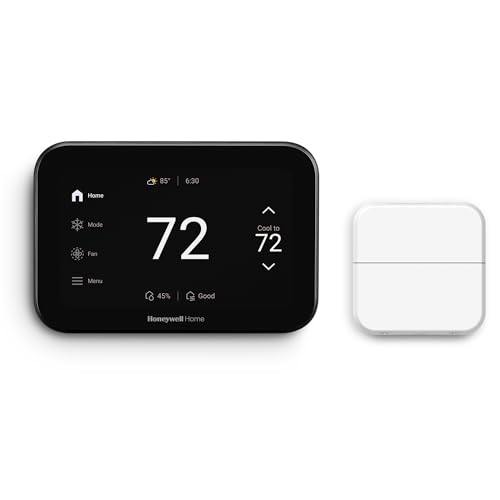
An AC thermostat with humidity control is a wall-mounted or smart thermostat that measures both indoor temperature and relative humidity, then manages your cooling equipment to keep both within target ranges. Standard thermostats only react to temperature. A humidity-control thermostat adds a second sensor and additional logic, so the system can run longer, slower, or in a dedicated dehumidification mode to pull moisture out of the air.
These devices are especially valuable in humid climates, basements, and tightly sealed modern homes where moisture builds up. They pair naturally with systems that support variable-speed blowers, which can dehumidify without drastically dropping the temperature. If your current setup struggles with sticky air, it is worth reviewing our guide to AC thermostat control to understand the basics before upgrading.
How Humidity Control Works Inside a Thermostat
Humidity control is not a single feature. It is a combination of sensing, logic, and equipment coordination. A thermostat with humidity control typically performs three tasks:
- Measures relative humidity using an onboard sensor, updated continuously or at short intervals.
- Compares readings to your target humidity setpoint, usually expressed as a percentage.
- Signals the HVAC system to adjust blower speed, run a dehumidify cycle, or stage cooling to remove moisture.
When the thermostat calls for dehumidification, it may slow the blower so air spends more time in contact with the evaporator coil, which extracts more moisture. Some systems also use a dedicated dehumidify terminal (often labeled DH or D) that tells the air handler to reduce airflow. On systems without that terminal, the thermostat may instead lower the cooling setpoint temporarily to trigger a longer cooling run, which also removes moisture. Understanding how the AC evaporator interacts with airflow helps explain why slower, longer runs dehumidify more effectively than short bursts of cooling.
Key Features to Compare Before You Choose
Humidity Sensing Accuracy
Look for models that publish a sensing tolerance, typically within a few percentage points, so you can trust the readings.
Dehumidify Terminal Support
Check whether the thermostat supports a dedicated DH terminal to control blower speed independently of cooling.
Variable-Speed Compatibility
Variable-speed blowers unlock true dehumidification without overcooling the room, so compatibility matters.
Humidity Setpoints
Adjustable target humidity, often between 40% and 60%, lets you balance comfort and condensation risk.
Smart Scheduling
Programmable and app-based schedules let you prioritize dehumidification when the home is occupied.
Alerts and Diagnostics
Notifications for high humidity or equipment faults help you catch problems before they escalate.
Humidity-Control Thermostat Tiers
Rather than sorting models by commercial positioning, it helps to classify them by capability tier. The table below describes what each tier generally delivers so you can align the thermostat with your HVAC system and comfort priorities.
| Tier | Best For | Typical Capabilities |
|---|---|---|
| Entry-Level | Single-stage systems and basic humidity awareness | Temperature plus humidity display, simple dehumidify trigger via cooling, basic scheduling. |
| Mid-Range | Two-stage systems and homeowners who want app control | Adjustable humidity setpoints, DH terminal support, app-based scheduling, basic diagnostics. |
| Premium | Variable-speed systems and whole-home comfort management | Precise humidity sensing, advanced dehumidification logic, multi-zone support, detailed alerts. |
| Professional-Grade | Complex systems, multi-stage equipment, and contractor-managed homes | Deep configuration options, remote diagnostics, integration with building management tools. |
Entry-level models are a solid choice for straightforward setups where humidity is a secondary concern. Mid-range models suit most households because they combine real dehumidify control with practical app features. Premium and professional-grade units are worthwhile when your system supports advanced staging or when you manage multiple zones. For a broader look at smart options, see our guide to the smart AC thermostat.
When a Humidity-Control Thermostat Makes Sense
A humidity-control thermostat is most valuable in specific situations. Consider one if any of the following apply:
- Your home feels clammy even when the temperature is set to a comfortable level.
- You live in a humid climate or near water, where moisture loads are consistently high.
- You have a variable-speed or two-stage system that can dehumidify without overcooling.
- You notice condensation on windows, ducts, or cool surfaces during cooling season.
- You want to raise the temperature setpoint slightly while maintaining comfort, which supports efficiency.
Conversely, in very dry climates, humidity control is less useful and a standard programmable thermostat is often sufficient. If your home runs dry in winter, pairing a humidity-aware thermostat with a humidifier may be more appropriate than focusing solely on dehumidification. The right choice depends on your climate zone and equipment. Homeowners in basement spaces and home offices often see the biggest comfort gains because those areas tend to hold moisture.
Compatibility: Matching the Thermostat to Your System
Humidity control depends on more than the thermostat. The air conditioner, air handler, and wiring must support it. Before purchasing, verify:
- Wiring terminals. Confirm whether your system has a DH or dehumidify terminal and whether the thermostat can use it.
- Blower type. Variable-speed and multi-speed blowers support gentle dehumidification better than single-speed units.
- System staging. Two-stage and variable-speed compressors pair well with humidity-control logic.
- Transformer capacity. Smart thermostats may require a C-wire or a power kit; check your setup.
If you are unsure about wiring, our guide to AC thermostat installation explains common configurations. It is also worth reviewing AC electrical problems if your current thermostat behaves erratically, since a faulty connection can cause misleading readings. In some cases, the thermostat itself is fine but the system cannot deliver the dehumidification the thermostat requests. Understanding the AC refrigerant cycle helps you see why airflow and coil temperature matter as much as the thermostat's logic.
Placement and Installation Considerations
Even a premium thermostat will misread humidity if it is placed poorly. Follow these placement rules:
- Mount on an interior wall, roughly at eye level, in a central living area.
- Avoid direct sunlight, supply registers, exterior doors, kitchens, and bathrooms.
- Keep the unit away from drafty hallways and areas with strong airflow.
- Ensure the wall behind the thermostat is not a source of heat or moisture.
If you are also upgrading airflow components, check your AC ductwork for leaks and balance issues. Poor duct performance can undermine humidity control by delivering uneven airflow. A properly sealed and balanced system helps the thermostat's humidity logic work as intended.
Humidity Control and Energy Efficiency
Humidity control is not just about comfort. It also supports efficiency. When indoor air is drier, a higher temperature feels comfortable, so you can set the thermostat a degree or two higher without sacrificing comfort. That adjustment reduces cooling demand. Additionally, a thermostat that dehumidifies efficiently can prevent the system from overcooling the home just to remove moisture, which is a common inefficiency in humid climates.
To maximize savings, pair the thermostat with regular maintenance. Clean filters, clear condensate lines, and a well-maintained evaporator coil all help the system dehumidify effectively. Our AC maintenance guide covers the routine tasks that keep humidity control performing reliably. If you notice persistent moisture problems, review the AC leaking water solution and check the AC unit coils for buildup that can reduce moisture removal.
Common Mistakes to Avoid
- Buying a humidity thermostat without checking system support. The thermostat can only request dehumidification; the system must be able to deliver it.
- Setting humidity targets too low. Overly aggressive targets cause long run times and can lead to overcooling or condensation issues.
- Ignoring placement. A thermostat near a bathroom or kitchen will read artificially high humidity.
- Skipping maintenance. A dirty coil or clogged drain line will defeat humidity control no matter how advanced the thermostat.
- Assuming all smart thermostats support humidity control. Verify the specific model's capabilities before buying.
Troubleshooting Humidity Control Problems
If your humidity-control thermostat is not delivering the expected comfort, check these areas:
- Thermostat reads high humidity but system is not dehumidifying. Confirm DH terminal wiring and that the air handler supports dehumidification.
- System runs constantly. The humidity setpoint may be too low, or the home may have air leaks that let moisture in.
- Uneven humidity between rooms. Airflow imbalance is likely; review duct design and register placement.
- Condensation on vents. Often indicates high indoor humidity; increase dehumidification or check insulation.
For broader diagnostics, see our AC troubleshooting hub. If the thermostat itself appears faulty, review AC only thermostat guidance before replacing it, and consider whether a non-programmable thermostat might be a simpler interim option.
Who Should Upgrade and Who Should Wait
Upgrade if you have a variable-speed or two-stage system, live in a humid climate, or notice persistent stickiness and condensation. Wait if your system is single-stage and your main concern is temperature scheduling, since a standard programmable thermostat may cover your needs. If you are planning a system replacement, it is often more effective to choose the thermostat alongside the equipment so humidity control is designed in from the start. Our AC sizing guide and AC installation guide can help you coordinate the upgrade.
Frequently Asked Questions
What is an AC thermostat with humidity control?
It is a thermostat that measures both temperature and indoor relative humidity and manages the cooling or dehumidification cycle to keep both within target ranges.
Does a humidity-control thermostat save energy?
It can help reduce energy use in humid climates because removing excess moisture allows a higher, still-comfortable temperature setting, and it prevents the system from over-cooling just to dehumidify.
Can any thermostat control humidity?
No. The thermostat must support humidity sensing, and the air conditioner or dehumidifier must support dehumidification control, either through a variable-speed blower or a dedicated dehumidify terminal.
Where should a humidity-control thermostat be installed?
Install it on an interior wall away from direct sunlight, supply registers, kitchens, bathrooms, and exterior doors. Proper placement ensures accurate humidity and temperature readings.
Do I need a C-wire for a smart humidity thermostat?
Most smart thermostats require a C-wire for stable power. If your system lacks one, a power kit or a compatible adapter may be needed. Check the model's installation requirements before purchase.
Ready to Compare Humidity-Control Thermostats?
Browse the recommended models below to find a thermostat that matches your system and comfort goals.