Mini Split Remote Thermostat: Complete Buyer & Setup Guide
Learn how mini split remote thermostats work, how to check compatibility, when a smart Wi-Fi controller is worthwhile, and how to set up precise temperature control for every zone in your home.
Start LearningWhy this guide exists: A ductless mini split is only as good as the controller that manages it. Many homeowners buy a system, then discover the factory handheld remote limits scheduling, remote access, or wall-mounted convenience. This guide explains your options before you commit.
What Is a Mini Split Remote Thermostat?
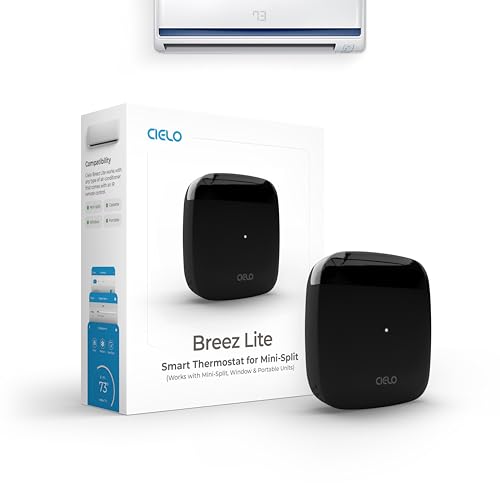
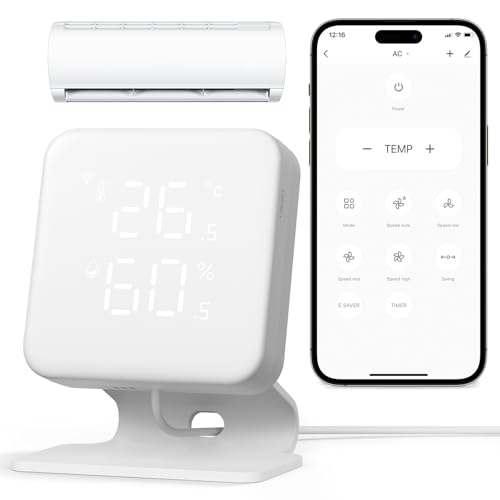
A mini split remote thermostat is the device that sets temperature, mode, fan speed, and scheduling for a ductless indoor unit. The term covers three broad categories: the factory handheld infrared remote, a wall-mounted wired controller, and a smart Wi-Fi thermostat that connects through native integration or an adapter module.
Unlike a conventional 24V thermostat that wires into a central furnace and air handler, mini split controllers often speak a proprietary language. That is why compatibility is the single most important question to answer before buying any third-party controller. For the broader system context, our ductless mini split system guide and the category overview on ductless mini split air conditioning systems are useful background reads.
The right controller improves comfort in tangible ways: consistent setpoints, timed schedules that match occupancy, and — on smart models — remote access so you can cool a room before you arrive. The wrong controller either will not connect or will only partially control the unit.
Why the Controller Matters More Than You Think
Precise Setpoints
A capable controller holds temperature within a tighter band, reducing the on-off swing that makes a room feel uneven.
Scheduling
Programmable timers match cooling to occupancy instead of running at full demand all day.
Zone Independence
In multi-zone systems, each indoor unit benefits from its own controller and its own schedule.
Remote Access
Smart controllers let you adjust temperature from another room or from anywhere via an app.
Integration
Top-tier smart thermostats connect to home automation platforms and voice assistants.
Diagnostics
Some controllers surface error codes and filter reminders, making maintenance easier to stay on top of.
Types of Mini Split Controllers
Controller options fall into a few practical categories. Each has trade-offs in convenience, compatibility, and setup complexity.
- Handheld Infrared Remote The factory remote included with most systems. Simple, no wiring, but requires line of sight and typically lacks scheduling depth.
- Wall-Mounted Wired Controller Mounts on the wall and communicates over a wired connection. No line-of-sight requirement and often includes scheduling and error displays.
- Smart Wi-Fi Thermostat Connects through native integration or an adapter module. Enables app control, geofencing, and home automation integration.
- Universal IR Controller Aftermarket handheld that learns codes from the factory remote. Useful as a backup but limited in advanced features.
- Brand-Specific Wall Thermostat Manufacturer-designed wall controller with full feature parity. Best compatibility, but tied to the brand ecosystem.
- Third-Party Interface Module A bridge that allows a standard smart thermostat to control certain mini split models. Compatibility varies widely by system.
Controller Comparison: Which Type Fits Your Setup?
| Category | Handheld IR Remote | Wired Wall Controller | Smart Wi-Fi Thermostat | Best For |
|---|---|---|---|---|
| Line of Sight Required | Yes | No | No | Rooms where the unit is easily visible |
| Scheduling Depth | Basic timers | Moderate to advanced | Advanced with app-based rules | Occupancy-driven comfort |
| Remote Access | No | No | Yes, via app | Second homes, irregular schedules |
| Compatibility Risk | None (factory included) | Low if brand-matched | Moderate to high without an adapter | Buyers who verify compatibility first |
| Tier Positioning | Essential tier | Mid-tier | Mid-range to top-tier | Scale of control desired |
For a broader look at the systems these controllers manage, browse mini split air conditioning units for sale and ductless mini split system air conditioners. If you are planning multiple zones, our multi-zone ductless AC guide explains how independent controllers fit into the layout, and a 24000 BTU mini split page illustrates a common mid-range capacity class.
Compatibility: The Most Important Check
Most mini split control problems trace back to an incompatibility between the controller and the indoor unit. Verify compatibility before you buy anything.
Brands differ in how they expose control: some publish a documented adapter or interface kit that allows third-party thermostats, others require a proprietary wall controller, and some support only the factory handheld remote. The safest path is to check the indoor unit's model number against the controller manufacturer's compatibility list, or consult the installing contractor.
- Record the indoor unit model number before shopping for a controller.
- Confirm whether the system supports a wired wall controller or only IR.
- Check whether a third-party smart thermostat needs an interface module.
- Verify the controller supports the modes you use (cool, heat, dry, fan).
- Confirm scheduling and app features match your household routine.
If you are also evaluating the underlying equipment, the ducted mini-split and ductless mini split with ceiling cassette pages explain indoor-unit formats that affect where a wall controller can be mounted. Electrical readiness matters too — see check home electrical panel and 110V vs 240V AC unit.
Setup and Configuration Tips
Once the controller is confirmed compatible, setup is usually straightforward. Pair a Wi-Fi controller with the home network, set the temperature scale, configure schedules around occupancy, and label each zone clearly in the app. For wired wall controllers, the technician typically configures the address and confirms communication with the indoor unit during commissioning.
A few practical habits improve results: avoid placing the controller in direct sunlight, keep it away from heat-producing appliances, and set schedules a few degrees apart rather than in large jumps. If the system is not holding setpoint, our things to check when AC is not cooling and AC not cooling solution guides walk through common causes. For airflow issues, see AC compressor running but not blowing air.
If you want to understand the refrigeration side of what the controller is orchestrating, the AC refrigerant cycle explains how cooling actually happens, and air conditioning gas covers refrigerant basics. For homes with humidity challenges, what humidity level is good for a house is a useful companion read.
Strengths and Trade-offs
Strengths
- Improved setpoint accuracy and comfort
- Scheduling that matches real occupancy
- Remote access on smart models
- Zone-level control in multi-zone systems
- Integration with home automation platforms
- Some models surface diagnostics and filter reminders
Trade-offs
- Compatibility varies significantly by brand
- Third-party smart thermostats may need an adapter
- Wired controllers require installation
- Advanced features can add setup complexity
- Some factory remotes are limited in scheduling depth
- Additional hardware is a separate consideration
Maintenance and Troubleshooting
A controller is only one part of the comfort equation. Keep indoor filters clean, schedule annual coil and drain checks, and pay attention to error codes displayed on wall controllers. Our AC maintenance guide and AC maintenance plan articles cover the routine. If the indoor unit leaks, see AC leaking water solution. If the system freezes up, AC frozen coils solution explains likely causes.
For homes with persistent comfort issues, it helps to understand the broader system — ductless vs ducted AC compares approaches, and AC for large house covers whole-home planning. If you are considering a different cooling format entirely, window air conditioner and portable air conditioner explain alternatives.
Buying Considerations
When comparing controllers, weigh compatibility first, then feature depth. Entry-level handheld remotes cover the essentials; mid-range wired and smart controllers add scheduling and remote access; top-tier smart thermostats add geofencing, energy reporting, and home automation integration. A controller is a long-term investment in how your system feels day to day, so it is worth matching the tier to your household's routine.
For related reading, the mini split remote thermostat page is the anchor for this topic, and ductless mini split air conditioner installation cost explains project scope factors. If you are exploring air quality add-ons, the air purifier overview is a useful context piece.
Compare Mini Split Remote Thermostat Options
Explore controllers that match your system, compare features across tiers, and check availability. Verify compatibility with your indoor unit before you commit.
Explore OptionsFrequently Asked Questions
What is a mini split remote thermostat?
A mini split remote thermostat is a controller that manages the temperature and operating modes of a ductless mini split system. It can be the factory handheld remote, a wall-mounted wired controller, or a smart Wi-Fi thermostat that connects through an adapter or native integration.
Can I use a standard thermostat with a mini split?
Not always. Many mini splits use proprietary communication protocols, so standard 24V thermostats are not directly compatible. Compatibility depends on the brand and model. Some systems support third-party controllers through an interface module, while others require a manufacturer-specific wall controller.
Do mini split remote thermostats work through walls?
Handheld infrared remotes require a line of sight to the indoor unit and typically do not work through walls. Wired wall controllers and Wi-Fi-enabled thermostats do not have this limitation and can control the system from another room or remotely via an app.
What features should I look for in a mini split remote thermostat?
Look for compatibility with your specific indoor unit, scheduling and programmable setpoints, remote app access if you want control away from home, and a clear display. Mid-range and top-tier smart models typically add geofencing, energy reports, and voice assistant integration.
Are smart mini split thermostats worth it?
For many homeowners, yes. Smart controllers add scheduling, remote access, and integration with home automation platforms. They are most worthwhile in multi-zone systems or homes with irregular occupancy patterns, where precise control reduces wasted conditioning.