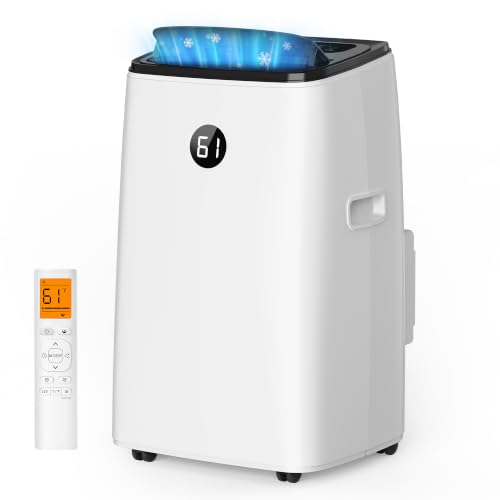
Portable Air Conditioner for Server Closet
Keep your critical IT equipment safe and operational with a properly sized portable cooling solution. This guide explains everything you need to know before making a purchase.
Explore the Buying GuideWhy Server Closet Cooling Matters: Servers, network switches, and UPS units generate continuous heat and require stable temperatures typically between 64°F and 77°F (18°C–25°C). Without adequate cooling, hardware throttles performance, degrades faster, and may fail entirely. A portable AC unit can serve as an effective spot-cooling solution when a dedicated HVAC system is not practical.
Why a Server Closet Needs Dedicated Cooling
Standard home air conditioning is designed for comfort cooling, not for the concentrated heat loads found in a server closet. A single rack server can produce as much heat as several household appliances combined, and small enclosed spaces trap that heat quickly. Even if your home stays comfortable, the temperature inside a closed server closet can rise dramatically within minutes.
Portable air conditioners designed for spot cooling offer a practical middle ground. They are self-contained, require no permanent installation, and can be positioned directly next to the heat source. If your server closet lacks the infrastructure for a ducted mini-split or central system, a portable unit is often the most straightforward approach.
Key Factors When Choosing a Portable AC for a Server Closet
1. BTU Capacity and Heat Load
Calculating the correct cooling capacity is the most important step. Unlike a bedroom, a server closet's heat load is dominated by electronic equipment, not by room size. You must account for the wattage of every device in the closet.
A common rule of thumb: multiply the total wattage of all equipment by 3.41 to get the BTU per hour of heat generated. Add that to the BTU required for the room's square footage (approximately 20 BTU per square foot for a typical space). The sum gives you a minimum baseline for the portable unit's cooling capacity.
For example, a server closet with 800 watts of equipment generates roughly 2,728 BTU/hour from electronics alone. Combined with the room size factor, a 5,000–6,000 BTU unit may be adequate for a small closet, while a larger closet with more equipment might need 8,000–10,000 BTU or higher. If you also need to cool adjacent spaces, explore portable air conditioners for very small rooms.
2. Venting Requirements
Portable air conditioners exhaust hot air through a hose that must be routed outside the room. In a server closet, this is often the biggest logistical challenge. If the closet has no window, you will need to find an alternative route — through a drop ceiling, a wall penetration, or a nearby room with a window.
If your closet has no window at all, consider options discussed in portable AC units for rooms without windows and portable air conditioners without window access. Some models are designed with flexible venting kits that can be adapted to unusual spaces. For narrow window openings, a portable AC for small windows may fit better.
3. Single-Hose vs. Dual-Hose Design
Single-hose portable units draw room air, cool the condenser with it, and exhaust that air outside. This creates negative pressure, which pulls warm outside air back into the closet through gaps — reducing efficiency. Dual-hose units separate the intake and exhaust streams, maintaining better pressure balance and cooling performance.
For a server closet where consistent temperature matters, a single-hose portable air conditioner can work in a pinch, but a dual-hose model is generally the preferred choice for efficiency and stability. If venting through a single opening is your only option, single-hose designs remain more practical.
4. Humidity Control and Condensate Management
Server closets are sensitive to humidity as well as temperature. Too much moisture risks condensation on circuit boards; too little increases static electricity. A portable AC with a built-in dehumidifier helps maintain a stable environment. Many units offer self-evaporating systems that handle most condensate automatically, but in very humid conditions you may still need to empty a drain tank.
If you prefer a unit that requires minimal manual drainage, look at portable air conditioners with self-evaporating systems or models designed as a portable air conditioner with no drain required. For closets that are especially humid, a unit with dedicated humidity management — discussed in portable AC with heater and dehumidifier — provides additional flexibility.
5. Placement and Airflow
Position the portable unit so that its cool air discharge blows directly toward the server rack or equipment. Keep at least 12–18 inches of clearance around the unit for intake and exhaust. Ensure the exhaust hose is as short and straight as possible — every bend and extra foot reduces cooling efficiency. Insulating the exhaust hose is also worthwhile; consider a portable air conditioner exhaust hose insulation sleeve to prevent heat radiating back into the closet.
6. Noise and Vibration
Server closets are often located near living spaces or home offices. Portable AC units produce noise from the compressor and fan. If the closet is adjacent to a bedroom or workspace, look for models with lower decibel ratings or features described in portable air conditioner overviews that highlight quiet operation. Vibration can also be mitigated by placing the unit on a rubber mat.
7. Power and Electrical Considerations
Portable AC units draw significant current. Make sure the closet's electrical circuit can handle the additional load alongside your server equipment. A dedicated circuit is ideal. If your server closet uses a UPS, verify that the portable AC is plugged into a separate outlet — not into the UPS — to avoid overloading it.
Comparison Table: Portable AC Tiers for Server Closets
| Tier | Typical Capacity | Best For | Key Features |
|---|---|---|---|
| Entry-level | 5,000–6,000 BTU | Small closets with 1–2 low-power devices | Single-hose, manual drain, basic controls |
| Mid-range | 8,000–10,000 BTU | Standard server closets with a small rack | Self-evaporating, digital thermostat, remote control |
| High-end tier | 12,000–14,000 BTU | Larger closets or rooms with multiple racks | Dual-hose, inverter compressor, Wi-Fi control, low noise |
| Professional-grade | 14,000+ BTU | Dedicated server rooms requiring continuous duty | Heavy-duty components, programmable scheduling, advanced dehumidification |
Step-by-Step Buying Checklist
- Calculate total heat load: Sum the wattage of all servers, switches, routers, and UPS units. Multiply by 3.41 for BTU/hour.
- Measure the closet: Note square footage and ceiling height. Add 20 BTU per square foot to the equipment heat load.
- Identify venting options: Check for windows, drop ceilings, or shared walls. If no window exists, review portable air conditioners without window venting or portable AC units that do not require venting for alternative approaches.
- Choose hose configuration: Dual-hose for efficiency; single-hose for limited venting options.
- Confirm drainage strategy: Self-evaporating for low maintenance; manual drain if humidity is high and you can monitor regularly.
- Check electrical capacity: Verify circuit amperage and avoid overloading UPS systems.
- Plan placement: Ensure clearance and direct airflow toward equipment.
- Consider smart controls: A portable air conditioner with Wi-Fi control lets you monitor closet temperature remotely and receive alerts.
Common Mistakes to Avoid
- Undersizing the unit: A portable AC that runs continuously without reaching the setpoint will wear out faster and fail to protect equipment.
- Ignoring the exhaust path: A poorly routed or excessively long hose dramatically reduces cooling capacity. Keep it short and insulated.
- Sealing the closet too tightly: Some airflow is necessary for the unit to function. Balance security with ventilation.
- Relying on a single unit without monitoring: Use a remote temperature sensor or smart thermostat to alert you if the closet overheats.
- Forgetting about winter operation: If your closet needs cooling year-round, verify the unit's operating range. Some portable ACs struggle in cold outdoor temperatures.
Maintenance Tips for Long-Term Reliability
Server closet cooling is a 24/7 operation, so maintenance matters more than in typical residential use. Clean or replace the air filter every two to four weeks — dust accumulation is the leading cause of reduced cooling and compressor strain. Inspect the exhaust hose for kinks or tears. Empty the drain tank regularly unless the unit is self-evaporating. Schedule a professional inspection annually if the unit runs continuously.
If you notice the unit running but not cooling effectively, refer to troubleshooting guidance such as my AC is running but not cooling or portable AC unit repair for diagnostic steps before calling a technician.
Frequently Asked Questions
Can a portable air conditioner run continuously in a server closet?
Many mid-range and high-end portable units are rated for continuous duty, but you should verify the manufacturer's specifications. Entry-level models may not be designed for 24/7 operation and could wear out prematurely. For critical server closets, choose a unit explicitly rated for continuous use.
How do I vent a portable AC in a closet with no window?
Options include routing the exhaust hose through a drop ceiling into an adjacent ventilated space, installing a wall vent kit, or using a door vent panel. If none of these are feasible, explore portable air conditioners without outside venting — though be aware that true cooling without exhaust is limited.
What temperature should a server closet be kept at?
Most IT equipment manufacturers recommend an intake air temperature between 64°F and 77°F (18°C–25°C), with humidity between 40% and 60%. Keeping the closet within this range maximizes hardware lifespan and reliability.
Is a mini-split better than a portable AC for a server closet?
A ductless mini-split is generally more efficient and quieter for permanent installations, but it requires professional installation and wall penetration. A portable AC is a practical choice when installation is not possible or when you need a flexible solution. For comparisons, see multi-zone mini-split systems if you are considering a larger-scale approach.
How often should I check the portable AC in my server closet?
Check the filter and drain tank weekly. Inspect the exhaust hose monthly. Use a remote temperature monitor to receive alerts if the closet temperature rises above your set threshold. A yearly professional service is recommended for units running continuously.
Can I use a portable evaporative cooler instead of an AC?
Evaporative coolers add moisture to the air and are not suitable for server closets, where humidity control is critical. Stick with a refrigerant-based portable air conditioner or a dedicated precision cooling system. For more on evaporative technology, see portable air conditioners with evaporative technology — but note they are generally not appropriate for IT environments.
Ready to Protect Your Server Closet?
Browse our curated selection of portable air conditioners suited for spot cooling server closets, network rooms, and small IT spaces. Each option is evaluated for capacity, venting flexibility, and continuous-duty reliability.
View Recommended Units