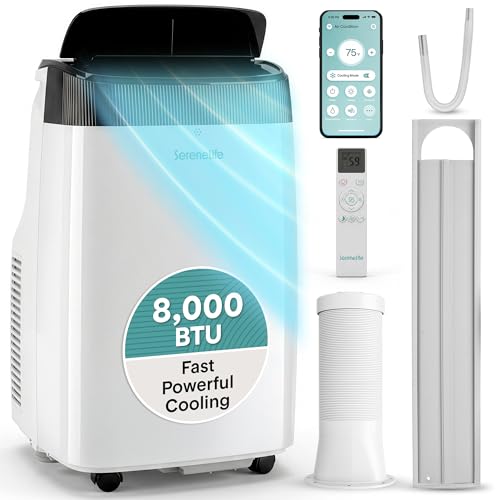
Portable Air Conditioner with Wi-Fi Control
Learn how smart portable ACs let you schedule cooling, adjust settings from your phone, and integrate with voice assistants — and what to check before you choose one.
EXPLORE TOP PICKSBuying insight: Wi-Fi control is more than a convenience feature. On a well-designed portable AC, app scheduling and remote access help you cool the room only when needed, which supports steadier temperatures and less wasted runtime. This guide explains what the technology delivers in daily use.
Why Wi-Fi Control Changes Portable AC Ownership
Portable air conditioners are flexible by nature, but their controls have traditionally been physical: a remote that gets lost, a panel on the unit that requires you to walk over, and timers that only work while you are home. A portable air conditioner with Wi-Fi control removes those limitations. You can start cooling before you arrive, adjust the temperature from bed, and set weekly schedules that match your routine.
The technology itself is straightforward. The unit connects to your home Wi-Fi router and communicates with a manufacturer app on your phone. Through that app you can change temperature, fan speed, and operating mode, set schedules, and in many cases connect to voice assistants. Some models also support geofencing, which starts cooling when your phone approaches home.
If you are new to the category, start with the portable air conditioner overview and the portable AC units hub for broader context before narrowing down to Wi-Fi models.
How Wi-Fi Control Works on a Portable AC
Understanding the components helps you judge whether a specific model will genuinely improve daily use or simply add an app you never open. Most Wi-Fi portable ACs share the same core building blocks:
- Wi-Fi module: Connects the unit to your home network, usually on the 2.4 GHz band for reliability and range.
- Manufacturer app: Provides temperature control, fan speed adjustment, mode selection, and scheduling from your phone.
- Cloud connection: Enables remote access when you are away from home and supports firmware updates.
- Voice assistant integration: Optional support for Alexa or Google Assistant, depending on the model.
- Geofencing: Uses your phone's location to trigger cooling as you approach home, available on mid-range and premium models.
The Wi-Fi portable AC guide and the portable AC with inverter technology overview both explain how these features pair with compressor technology for better results.
Sizing a Wi-Fi Portable AC Correctly
Smart features do not compensate for incorrect capacity. An undersized Wi-Fi unit will still run constantly and fail to reach the set temperature, no matter how convenient the app is. Use the table below as a baseline, then adjust for sun exposure and occupancy.
| Room Size | Recommended BTU | Best For |
|---|---|---|
| Up to 150 sq ft | 5,000 – 6,000 BTU | Bedrooms, home offices, dorms |
| 150 – 250 sq ft | 8,000 – 10,000 BTU | Living rooms, studios, guest rooms |
| 250 – 400 sq ft | 12,000 – 14,000 BTU | Open-plan spaces, large bedrooms |
| 400 – 550 sq ft | 14,000 – 16,000 BTU | Basements, converted garages |
For compact spaces, the small-room portable AC guide and the very small room portable AC recommendations offer more granular sizing advice. For larger footprints, see the 500 sq ft portable AC breakdown and the 1,000 sq ft portable AC guide.
Wi-Fi Portable AC Tiers: What Each Level Delivers
Wi-Fi control appears across market tiers, but the quality of the app, the reliability of the connection, and the overall build vary. Here is how the tiers differ.
Essential Tier
Basic Wi-Fi connectivity with core app controls: temperature, fan speed, and mode selection. Scheduling may be limited, and voice assistant support is often absent. Best for occasional use where app control is a convenience rather than a daily requirement.
Balanced Tier
Reliable app connection, weekly scheduling, geofencing, and voice assistant support. Quieter compressors and better exhaust design often accompany the smart features. Most households find this tier delivers the best balance of smart control and consistent cooling.
High-End Tier
Inverter compressors, advanced app features such as energy usage insights and multi-user access, robust Wi-Fi modules, and reinforced cabinet construction. These models are designed for daily use across seasons and integrate cleanly with broader smart home setups.
Mid-range Wi-Fi models typically offer more reliable app connectivity than entry-level units because the Wi-Fi module and firmware are better matched to the control interface. Premium inverter models modulate compressor speed rather than cycling on and off, which produces steadier temperatures and quieter operation — benefits that complement the convenience of app control. If inverter technology interests you, the portable AC with inverter technology guide explains the mechanism in detail.
Features That Determine Real Wi-Fi Performance
App Quality and Connection Reliability
The best Wi-Fi hardware is useless if the app is slow or the connection drops. Look for models with a stable 2.4 GHz Wi-Fi module and a companion app with clear reviews on both iOS and Android. A well-designed app loads quickly, remembers your settings, and reconnects automatically after a power interruption. The Wi-Fi portable AC deep dive compares real-world app experiences across tiers.
Scheduling and Geofencing
Weekly scheduling lets you set different cooling patterns for weekdays and weekends, so the unit runs only when you actually need it. Geofencing adds a location-based layer, starting cooling as you approach home. These features are most useful in bedrooms and home offices where occupancy follows a predictable pattern. See the bedroom portable AC guide for room-specific scheduling advice.
Voice Assistant Integration
Alexa and Google Assistant support lets you adjust temperature or turn the unit on and off with voice commands. This is convenient in hands-busy moments but rarely replaces the app for detailed scheduling. Confirm that the model you are considering supports the assistant you actually use.
Exhaust and Window Compatibility
Smart features do not change the physics of exhaust. A dual-hose design balances intake and exhaust, which generally produces more consistent cooling than a single-hose unit. If your window is non-standard, review the casement window portable AC guide and the sliding window kit overview before committing to a model.
Matching a Wi-Fi Portable AC to Your Space
Bedrooms and Home Offices
These rooms benefit most from scheduling and remote control. A 5,000–8,000 BTU Wi-Fi unit with a sleep mode and dimmable display is usually the right fit. The bedroom portable AC guide and the small-room portable AC recommendations both address this use case directly.
Living Rooms and Open Spaces
Larger rooms need more capacity and benefit from geofencing that starts cooling before you arrive. A 10,000–14,000 BTU Wi-Fi unit with a dual-hose exhaust is a solid match. For open-plan layouts, the 500 sq ft portable AC breakdown offers specific guidance.
Basements and Rooms Without Standard Windows
Basements combine high humidity with small or unusual windows. A Wi-Fi unit with strong dehumidification and a flexible window kit is essential. See the basement window portable AC guide for specific configurations. For rooms with no window at all, the no-window portable AC overview and the windowless room portable AC guide explain the venting options that actually work.
Humid Climates
In humid regions, the evaporation system works harder. Wi-Fi scheduling helps by running the unit in shorter, well-timed cycles rather than continuously. The humid climate portable AC guide and the high-humidity portable AC recommendations cover this in depth.
A Practical Checklist Before You Buy
- Confirm the app is available on your phone's platform and has a track record of reliable updates.
- Verify the unit connects on 2.4 GHz Wi-Fi, which offers better range than 5 GHz in most homes.
- Check whether scheduling and geofencing are included or require a subscription (most do not).
- Match BTU to your room size and adjust upward for sun exposure, kitchens, or high occupancy.
- Identify your window type and verify that the included window kit fits — or that a compatible kit exists.
- Confirm voice assistant support if you plan to use Alexa or Google Assistant.
- Check the noise rating if the unit will run in a bedroom or home office.
- Verify warranty terms and whether the manufacturer offers service in your region.
If you are still exploring form factors — single-hose versus dual-hose, vented versus ventless — the single-hose portable AC guide and the non-window vented portable AC overview clarify the trade-offs. For broader context, the portable air conditioner hub links to every sub-guide on the site.
Explore Related Portable AC Guides
- Portable Air Conditioner: Complete Overview
- Portable AC Units: Full Category Guide
- Portable AC with Inverter Technology
- Portable AC with Self-Evaporating System
- Portable AC with No Drain Required
- Portable AC That Doesn't Need Draining
- Portable AC for Casement Windows
- Portable AC Sliding Window Kit
- Portable AC for Basement Windows
- Portable AC for a Room with No Window
- Portable AC Unit for Rooms Without Windows
- Portable AC for Humid Climates
- Portable AC for High Humidity
- Portable AC for Commercial Use
- Commercial-Grade Portable AC Units
- Portable AC Unit for Bedroom
- Single-Hose Portable AC Guide
- Non-Window Vented Portable AC
- Portable ACs for Small Rooms
- Portable AC for a Very Small Room
- Portable AC for a 500 Sq Ft Room
- Portable AC for 1,000 Square Feet
- Portable Air Conditioner on Sale
Frequently Asked Questions
What does Wi-Fi control actually add to a portable air conditioner?
Wi-Fi control lets you adjust temperature, fan speed, and operating modes from a smartphone app, schedule cooling around your routine, and often integrate with voice assistants. It removes the need to be physically near the unit to change settings.
Do I need a smart home hub to use a Wi-Fi portable AC?
Most Wi-Fi portable ACs connect directly to your home router through a dedicated app, so a separate hub is not required. Voice assistant integration may need a compatible smart speaker, but the core app control works independently.
Can I schedule a Wi-Fi portable AC to turn on before I get home?
Yes. App-based scheduling and geofencing are common in mid-range and premium Wi-Fi portable ACs. You can set the unit to start cooling at a specific time or when your phone approaches home, so the room is comfortable when you arrive.
Is Wi-Fi control worth it compared to a remote-controlled portable AC?
Wi-Fi control adds value when you want scheduling, remote access, or voice control. If you only ever adjust settings while in the same room, a standard remote is sufficient. Mid-range Wi-Fi models often bundle better compressors and quieter operation alongside the smart features.