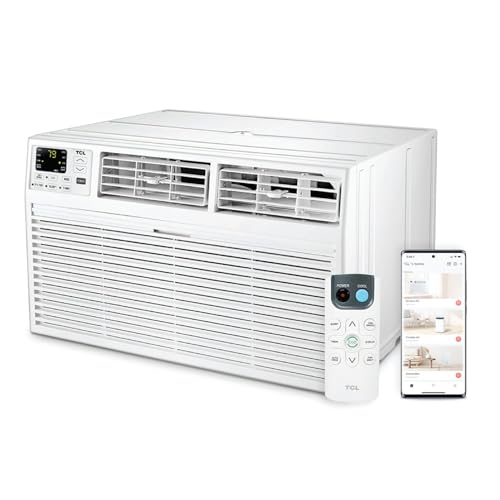
Through the Wall Air Conditioner with WiFi: Smart Cooling for Any Room
A through the wall air conditioner with WiFi combines the permanent, space-saving profile of a wall-mounted unit with the convenience of app-based and voice-controlled climate management. This guide explains how smart wall ACs work, what to check before buying, and how to choose the right capacity and feature set for your space.
Who this guide is for: homeowners, renovators, and property managers who have already decided on a wall-sleeve cooling solution and now want smart connectivity, reliable performance, and a unit that fits their room, electrical setup, and daily routine. If you are still comparing form factors, start with our broader overview of through the wall AC units before narrowing down to WiFi-enabled models.
What Makes a Through the Wall AC "Smart"?
A through the wall air conditioner with WiFi keeps the classic wall-sleeve form factor: the chassis slides into a permanent opening in an exterior wall, with the condenser side facing outdoors and the evaporator side blowing conditioned air into the room. What changes with a WiFi model is the control layer. Instead of relying only on a front-panel keypad or a handheld remote, the unit connects to your home network and exposes its settings through a mobile app.
In practice, smart connectivity usually includes several of the following capabilities:
- Remote on/off and temperature adjustment from anywhere with an internet connection.
- 7-day programmable schedules that can differ by day and by season.
- Operating mode switching between cool, fan, dry/dehumidify, and — on combo models — heat.
- Voice assistant integration with Amazon Alexa and Google Assistant on many models.
- Energy usage insights or filter-cleaning reminders in some companion apps.
- Geofencing or away-mode routines on higher-tier units, which adjust cooling when you leave or approach home.
It is worth being precise about terminology. A "WiFi through the wall AC" is not the same as a ductless mini-split with WiFi, even though both are wall-mounted and app-controlled. The through the wall unit is a single packaged chassis in a sleeve, while a mini-split uses a separate outdoor condenser and an indoor head. If you are weighing those two paths, our comparison of through the wall air conditioning units and ductless systems is a useful next read.
Why Choose a WiFi-Enabled Wall Unit?
The appeal of smart connectivity is mostly about daily convenience and better energy discipline, not about raw cooling power. A WiFi through the wall AC cools exactly like its non-connected sibling; the difference is how precisely and effortlessly you can manage it.
Schedule Around Your Routine
Set the unit to pre-cool a bedroom before bedtime or to ease off while the house is empty, without touching a remote.
Control From Another Room
Adjust settings from the couch, the office, or the car. No line-of-sight requirement like infrared remotes.
Voice Convenience
Hands-free changes through Alexa or Google Assistant are helpful in kitchens, home gyms, and accessible-living setups.
Better Energy Habits
Schedules and away modes reduce accidental all-day running, which is often the biggest driver of cooling energy use.
For rental properties, guest rooms, and home offices, the remote-management angle is especially practical: you can verify that a unit is running as intended without being on site. If your priority is portability rather than a permanent wall opening, a stand-alone air conditioner unit may fit better, but it will not match the clean, flush installation of a wall-sleeve model.
Key Features to Compare Before Buying
Two WiFi wall units can look similar on a product page yet differ meaningfully in day-to-day use. Focus on the following specification areas.
1. Capacity and Room Match
Cooling capacity is expressed in BTU per hour. As a rough starting point, many homes need about 20 BTU per square foot of floor area, adjusted upward for strong sun, high ceilings, kitchens, and rooms with many occupants or electronics. A 10,000 BTU unit is commonly paired with rooms in the 350–450 square foot range, while 12,000 BTU models suit larger bedrooms and open living areas. Our guides to 10,000 BTU through the wall units and 14,000 BTU through the wall models break down room matching in more detail.
2. Voltage and Circuit Requirements
Through the wall units are sold in 110–120V and 220–240V versions. The larger-capacity models are typically 230/208V and need a dedicated circuit. Before ordering, confirm the outlet type and breaker rating in the wall sleeve area. Our explainer on 110-volt through the wall ACs and the companion guide to 240-volt models cover the practical differences.
3. Sleeve Dimensions and Fit
Wall sleeves come in standard and non-standard sizes. Measure the existing opening precisely — width, height, and depth — and compare it with the chassis dimensions, not just the faceplate. Common opening sizes include 26 × 16 inches, 26 × 17 inches, and 27 × 17 inches. If you are replacing an older unit, our through the wall AC replacement guide and the dimension-specific pages for 26 × 16, 26 × 17, and 27 × 17 openings are useful references.
4. Cooling-Only vs. Heat-Pump Combo
Some WiFi wall units are cooling-only; others include a heat pump or electric heater for year-round use. A heat-pump combo can replace a separate space heater in shoulder seasons, which simplifies the wall and the electrical load. Compare the through the wall AC with heat pump and the heater combo options if four-season operation matters to you.
5. Dehumidification and Fan Modes
Humidity control is a major comfort factor in coastal and humid climates. Look for a dedicated dry mode and a fan-speed range that includes a low setting for quiet overnight operation. Units with a dehumidifier function are covered in our guide to the through the wall AC with dehumidifier.
6. Noise Level and Build Quality
Compressor and fan noise matter in bedrooms and home offices. Higher-tier models generally use better vibration isolation and quieter fan blades, while entry-level units are louder at comparable capacities. Also check the outdoor grille and weather sealing, since a wall-sleeve installation is exposed to rain, wind, and debris.
7. Smart App Quality and Ecosystem Support
Not all companion apps are equal. Check recent user feedback for reliability of scheduling, response time, firmware updates, and whether the app supports both Alexa and Google Assistant. A well-implemented WiFi stack with stable firmware is more valuable than a long feature list that rarely works as advertised.
Comparing Market Tiers Without Guessing
Through the wall WiFi units fall into recognizable market tiers. The descriptors below are relative positions, not absolute judgments, and they help you set expectations before you compare specific models.
| Tier | Typical Strengths | Best For |
|---|---|---|
| Entry-level | Basic WiFi control, straightforward scheduling, solid cooling for the capacity | Guest rooms, rentals, and secondary spaces where simple remote control is enough |
| Mid-range | Better app stability, quieter operation, improved fan and compressor insulation, more granular schedules | Primary bedrooms, home offices, and living areas used daily |
| High-end tier | Refined build quality, heat-pump or heater combo options, energy insights, stronger weather sealing | Year-round use, humid climates, and rooms where noise and efficiency matter most |
| Commercial-grade | Heavy-duty chassis, serviceable components, longer duty cycles, robust sleeve integration | Multi-unit properties, managed rentals, and light commercial spaces |
When comparing within a tier, prioritize the items that affect your daily experience: accurate temperature holding, low fan noise at night, a responsive app, and a sleeve fit that does not require modification. Those four factors usually matter more than a long list of secondary features.
Installation and Setup Checklist
A WiFi wall AC is only as good as its installation. Work through this checklist before and after the unit goes in.
- Measure the sleeve accurately. Width, height, and depth should all be recorded, plus the location of the electrical outlet relative to the opening.
- Confirm the circuit. Match the unit's voltage and amperage to the existing breaker and outlet. Do not assume a 240V unit will run on a 120V circuit.
- Inspect the sleeve and exterior. Look for rot, rust, gaps, and poor drainage. A tired sleeve undermines even a premium unit.
- Seal and insulate. Use the manufacturer's seal kit and add insulation around the chassis to prevent air leaks and condensation.
- Connect to WiFi during setup. Most apps require a 2.4 GHz network for initial pairing. Keep the router within reasonable range of the unit.
- Test all modes. Run cool, fan, dry, and heat (if equipped) and confirm that schedules and voice commands respond correctly.
- Register the warranty. Keep the serial number and installation date on file in case service is needed.
If you are replacing an older chassis rather than installing a new sleeve, our notes on 19 × 14 through the wall units and 26 × 18 openings can help you confirm whether a current model will drop in without modification.
Maintenance Habits That Keep a Smart Wall AC Efficient
WiFi features help with scheduling, but the physical unit still needs routine care. A clean filter and coil set is the difference between a unit that holds temperature quietly and one that strains in summer heat.
- Clean or replace the air filter every 2–4 weeks during heavy use. Many smart apps include a filter reminder, but do not rely on it alone.
- Inspect the outdoor side seasonally. Clear leaves and debris from the condenser grille and confirm that the sleeve drains properly.
- Check the seal around the chassis. Re-caulk or re-foam if you notice drafts, water intrusion, or condensation on the interior wall.
- Update the app and firmware. Smart features improve over time, and updates often fix connectivity quirks.
- Schedule professional service every few years to clean coils and verify refrigerant charge, especially if cooling performance drops.
If you notice the unit running constantly without reaching the set temperature, work through our troubleshooting reference on why an AC is not blowing cold air before assuming the unit needs replacement.
How a WiFi Wall Unit Fits Into a Larger Cooling Plan
Through the wall units are excellent point solutions: they cool one room well without ductwork, and they free up window space. But they are not a whole-home strategy on their own. If you are cooling several rooms, it helps to think in terms of zones. A bedroom with a wall sleeve, a living area with a different system, and a home office with a supplementary unit can all coexist, provided the electrical capacity and scheduling are coordinated.
For homes without ducts, a through the wall inverter air conditioner can be a strong efficiency upgrade over a fixed-speed compressor because the inverter modulates output instead of cycling on and off. Inverter models pair especially well with WiFi controls, since precise modulation and precise scheduling reinforce each other.
Common Mistakes to Avoid
- Buying by BTU alone. Fit, voltage, and sleeve dimensions matter just as much as capacity.
- Assuming all WiFi apps are equal. Read recent reviews about pairing reliability and schedule behavior.
- Ignoring the outdoor side. A poorly sealed sleeve invites water damage and reduces efficiency.
- Oversizing the unit. A unit that is too large cools quickly but dehumidifies poorly and short-cycles the compressor.
- Skipping the heat-pump decision. If you need shoulder-season heating, choose a combo model up front rather than adding a separate heater later.
Frequently Asked Questions
How does a through the wall air conditioner with WiFi work?
A WiFi model connects to your home network and exposes its controls through a smartphone app or voice assistant. The cooling hardware is the same packaged wall-sleeve design; the added connectivity enables remote on/off, schedules, mode changes, and sometimes energy insights. Setup usually requires a 2.4 GHz network for initial pairing.
Can I install a WiFi through the wall AC myself?
If a compatible wall sleeve already exists, replacing the chassis is often a manageable DIY task. Creating a new opening requires cutting and framing the wall, electrical work, and exterior weather sealing, which is best handled by a qualified HVAC technician or contractor.
Do through the wall AC units with WiFi need a special thermostat?
No. Most models include built-in digital controls and a companion app that serves as the thermostat interface. Some units can work with external smart thermostats, but it is not required for basic smart operation.
What size through the wall AC with WiFi do I need?
Start with roughly 20 BTU per square foot, then adjust for sun exposure, ceiling height, occupancy, and kitchen heat. Confirm the BTU rating against your room size and check that the voltage and sleeve dimensions match your installation. Our 18,000 BTU through the wall guide is useful for larger open spaces.
Is a WiFi through the wall AC worth it compared with a standard remote-control model?
If you value scheduling, remote access, and voice control, the smart layer adds real day-to-day convenience. If you only ever adjust the unit by hand, a standard model may be sufficient. The decision is about control habits rather than cooling performance.
Ready to Compare Smart Wall Units?
Use the recommended products below to compare capacities, sleeve sizes, voltage options, and smart features. Check dimensions and circuit requirements against your installation before ordering.